Documentation
What it does
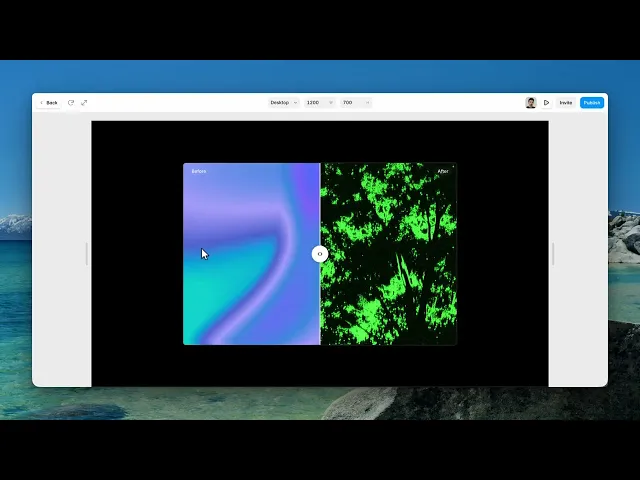
Two images stacked, with a handle you drag to wipe between them.
It's the standard way to show a change — a retouch, a renovation, a redesign — and it works because the visitor controls the comparison themselves.
Controls
38 controls, 5 of which only appear when they are relevant.
Control | Type | Default | Notes |
|---|---|---|---|
Before | ResponsiveImage | — | — |
After | ResponsiveImage | — | — |
Orientation | Enum | Horizontal / Vertical — default | — |
Fit | Enum | Cover / Contain — default | — |
Position | Number |
| 0–100% |
Drag Area | Boolean |
| — |
Handle | Boolean |
| — |
Size | Number |
| 16–120px |
Radius | Number |
| 0–60px |
Fill | Color |
| — |
Icon | Enum | Arrows / Dots / None — default | — |
Icon Color | Color |
| — |
Hover Scale | Number |
| 1–1.4 |
Shadow | Boolean |
| — |
Focus | Color |
| — |
Line Width | Number |
| 0–12px |
Line Color | Color |
| — |
Labels | Boolean |
| — |
Before Text | String |
| — |
After Text | String |
| — |
Font | Font |
| — |
Color | Color |
| — |
Background | Color |
| — |
Radius | Number |
| 0–40px |
Padding X | Number |
| 0–40px |
Padding Y | Number |
| 0–40px |
Offset | Number |
| 0–60px |
Blur | Number |
| 0–20px |
Auto Animate | Boolean |
| — |
Speed | Number |
| .5–10s · conditional |
From | Number |
| 0–100% · conditional |
To | Number |
| 0–100% · conditional |
Pause on Hover | Boolean |
| conditional |
Snap | Boolean |
| — |
Stops | Number |
| 2–10 · conditional |
Radius | BorderRadius |
| — |
Border | Border | — | — |
Shadow | BoxShadow |
| — |
Working through the panel
The basics
Set the Before and After images. They must be framed identically — same crop, same angle, same size. Everything about this component depends on that, and no setting will rescue two pictures that don't line up.
Orientation is horizontal or vertical. Vertical suits tall images and comparisons where the change is top to bottom.
Position is where the divider starts. Not fifty percent — start it off-centre so the visitor arrives already seeing more of one image, which makes the drag feel like a discovery rather than a chore.
Drag Area lets people drag anywhere on the image rather than only on the handle, which is much more forgiving.
Handle and labels
The Handle group holds its size, radius, fill, icon — arrows, dots or none — icon colour, hover scale, shadow, and a Focus colour.
That focus colour is the outline shown when someone reaches the handle by keyboard. It's there because this component is operable without a mouse, and that only helps if the handle is visible when focused.
The Labels group carries the Before and After wording, plus font, colours, background, radius, padding, offset and a blur behind them.
Rename them to say what changed. Before and After is generic; Original and Restored, or Two thousand nineteen and Today, tells the story.
Motion and snapping
Auto Animate makes the divider sweep on its own, which reveals four controls: Speed, a From and To range so it doesn't travel the full width, and Pause on Hover.
Pause on Hover matters — an animating divider that keeps moving while someone is trying to look at a detail is actively annoying.
Use auto animate to advertise that the component is interactive, then let the visitor take over.
Snap makes the divider settle at fixed positions, with a Stops count. Useful for a three-way comparison; wrong for a smooth reveal.
Then radius, border and shadow for the frame.
Performance and limits
It stops rendering when it scrolls out of view, so an instance below the fold costs nothing until the visitor reaches it.
Static rendering is handled, so canvas thumbnails and exports show a settled frame rather than a blank box.
Good to know
No setup or coding required. Responsive across desktop, tablet, and mobile.
Refund policy — due to the nature of digital products, all sales are final. Once purchased, this component is non-refundable. Please make sure it fits your needs before completing the checkout.
Support: hi@alicorak.com




