Documentation
What it does
Every click throws a small burst of graphics out from the cursor, then it fades.
It's feedback. A click that produces nothing visible feels slightly dead, and this fills that gap without changing anything about how the page works.
Controls
11 controls.
Control | Type | Default | Notes |
|---|---|---|---|
Style | Enum | Rays / Burst / Sparkles / Ring / Mix — default | — |
Click Area | Enum | Component / Whole Page — default | — |
Color | Color |
| — |
Accent | Color |
| — |
Size | Number |
| 12–120px |
Density | Number |
| 4–16 |
Stroke | Number |
| 1–8px |
Duration | Number |
| .15–1.8s |
Max Effects | Number |
| 1–30 |
Blend | Enum | Normal / Multiply / Screen / Add — default | — |
On Effect | EventHandler | — | — |
Working through the panel
Style and scope
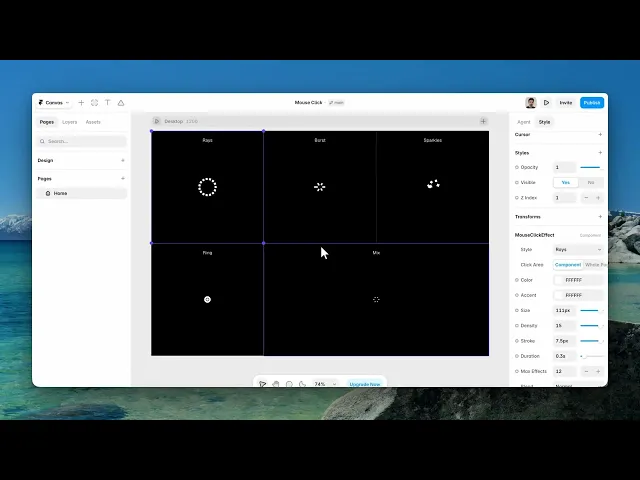
Five styles — rays, burst, sparkles, ring, and mix, which cycles between them.
Then Click Area, which is the important decision. Component keeps the effect inside its own frame. Whole Page makes every click anywhere produce a burst.
Whole Page is tempting and usually wrong. An effect that fires on every click, including clicks on form fields and navigation, stops reading as delight and starts reading as noise. Use it for a landing page, not for anything with a task in it.
Look
Two colours, so the burst can carry your accent alongside a neutral.
Size is how far it spreads. Density is how many pieces are thrown. Stroke is how thick they are.
Duration is how long each burst lives. Short reads as a tap; long leaves graphics on screen while the visitor is already doing the next thing, which is worse than no effect at all.
Limits and events
Max Effects caps how many bursts can be on screen at once. It exists because people click quickly, and without a cap a fast clicker can stack up dozens of animations at the same time.
Blend decides how the burst mixes with what's underneath. Screen and Add glow on dark backgrounds; Multiply works on light ones.
And there's an event handler that fires on each effect, so you can hang your own behaviour off a click.
One last thing worth knowing. There's no control for it, and there doesn't need to be: the component automatically calms itself for visitors whose system asks for reduced motion.
Performance and limits
Visitors whose system asks for reduced motion get a calmer version automatically.
Static rendering is handled, so canvas thumbnails and exports show a settled frame rather than a blank box.
Good to know
No setup or coding required. Responsive across desktop, tablet, and mobile.
Refund policy — due to the nature of digital products, all sales are final. Once purchased, this component is non-refundable. Please make sure it fits your needs before completing the checkout.
Support: hi@alicorak.com




