Documentation
What it does
A live clock that shows either the visitor's own time or a fixed timezone you choose.
Which of those two you pick changes what the component means. The visitor's own time says the site is alive. A fixed zone says where you are — which is what a studio or a freelancer usually wants.
Where you would use it
Great for personal sites ("my local time"), agency contact pages, footers, and global team pages.
Controls
15 controls, 3 of which only appear when they are relevant.
Control | Type | Default | Notes |
|---|---|---|---|
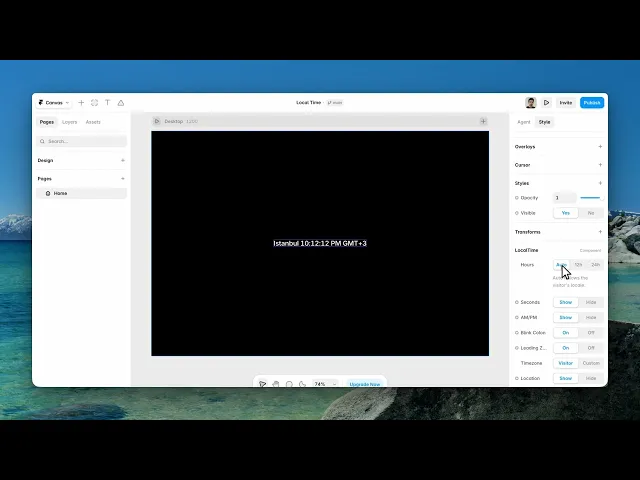
Hours | Enum | Auto / 12h / 24h — default | Auto follows the visitor's locale. |
Seconds | Boolean |
| — |
AM/PM | Boolean |
| conditional |
Blink Colon | Boolean |
| — |
Leading Zero | Boolean |
| — |
Timezone | Enum | Visitor / Custom — default | — |
Zone | Enum | ...COMMON_ZONES.map(([ / title])=>title) / Custom… — default | conditional |
IANA Zone | String | — | IANA zone name, e.g. Europe/Istanbul or America/New_York. · conditional |
Location | Boolean |
| Shows the city of the active time zone before the time. |
Zone Label | Boolean |
| — |
Prefix | String | — | — |
Suffix | String | — | — |
Color | Color |
| — |
Font | Font |
| — |
Text Select | Boolean |
| — |
Working through the panel
Timezone
Timezone is the first decision: Visitor or Custom.
Pick Custom and a Zone control appears with common zones listed. If yours isn't there, choose the custom option and a field appears for an IANA zone name — that's the standard format, like Europe slash Istanbul.
There are also two labels you can turn on: Location, which names the place, and Zone Label, which shows the abbreviation. On a contact page, showing your city next to your local time is the entire point of adding a clock.
Format
Hours is auto, twelve-hour or twenty-four. Auto follows the visitor's own locale, which is the right choice when you're showing their time and the wrong one when you're showing yours — because your studio's hours shouldn't change format depending on who's looking.
On twelve-hour there's an AM/PM toggle. Seconds adds the seconds. Leading Zero pads single digits.
And Blink Colon makes the separator flash once a second, which is a small detail that makes the clock read as running rather than as a static time.
Text and styling
Prefix and Suffix are your own words around the time — currently, my time, local time in Istanbul.
Then colour and font.
Text Select is off by default, which stops the clock being selectable as text. That's usually right: a clock isn't content anyone needs to copy, and a highlighted clock looks like a mistake.
Performance and limits
Static rendering is handled, so canvas thumbnails and exports show a settled frame rather than a blank box.
Good to know
No setup or coding required. Responsive across desktop, tablet, and mobile.
Refund policy — due to the nature of digital products, all sales are final. Once purchased, this component is non-refundable. Please make sure it fits your needs before completing the checkout.
Support: hi@alicorak.com




