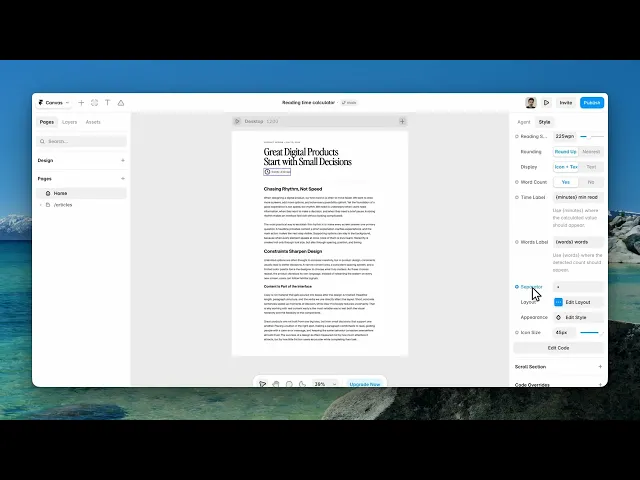
Documentation
What it does
It counts the words in your article and prints how long it takes to read.
It's a small promise to the reader before they commit — and on a long page, it's the difference between someone starting and someone leaving.
Where you would use it
Content Source is the first decision.
Text means you paste the article into a field yourself. That's reliable but it's a copy you have to keep in sync, and it will drift.
Auto reads the words from the page instead, and reveals a Content Area field — a CSS selector for the element holding your article. Point it at your article container and the count follows the real content, including when you edit it.
Use Auto, and take the time to get the selector right. Point it too wide and you'll be counting your navigation and footer.
Perfect for blogs, case studies, documentation, and newsletters.
Controls
20 controls, 5 of which only appear when they are relevant.
Control | Type | Default | Notes |
|---|---|---|---|
Content Source | Enum | Text / Auto — default | — |
Content | String |
| Paste your article or case study text. · conditional |
Content Area | String |
| Auto reads text from this page area. For CMS, give your Rich Text the Element ID ‘reading-content’, then use #reading-content. · conditional |
Reading Speed | Number |
| 100–500wpm |
Rounding | Enum | Round Up / Nearest — default | — |
Display | Enum | Icon + Text / Text — default | — |
Word Count | Boolean |
| — |
Time Label | String |
| Use {minutes} where the calculated value should appear. |
Words Label | String |
| Use {words} where the detected count should appear. · conditional |
Separator | String |
| conditional |
Alignment | Enum | Left / Center / Right — default | — |
Padding | Padding |
| — |
Gap | Gap |
| — |
Radius | BorderRadius |
| — |
Font | Font |
| — |
Background | Color |
| — |
Text | Color |
| — |
Border | Border |
| — |
Shadow | BoxShadow |
| — |
Icon Size | Number |
| 8–48px · conditional |
Working through the panel
The calculation
Reading Speed is words per minute, defaulting to two hundred and twenty-five, which is a reasonable average for adult reading on screen.
Don't inflate it to make your articles look shorter. A reader who finishes in twice the promised time trusts the next estimate less.
Rounding is up or nearest. Up is the honest choice — it never promises less time than the reader will need.
Word Count optionally shows the number of words alongside, with its own label and a separator between the two.
Wording and styling
Time Label and Words Label are templates with placeholders in them, so you write the sentence and the component fills in the numbers. That's how you get a phrase in your own voice instead of a generic badge.
Display is icon plus text, or text alone, with an icon size when the icon is showing.
The styling is grouped: Layout holds alignment, padding, gap and radius. Appearance holds font, background, text colour, border and shadow.
The defaults make a pill, which suits sitting under a heading. Flatten the radius and drop the background if you'd rather it read as a line of text.
Performance and limits
Static rendering is handled, so canvas thumbnails and exports show a settled frame rather than a blank box.
Good to know
No setup or coding required. Responsive across desktop, tablet, and mobile.
Refund policy — due to the nature of digital products, all sales are final. Once purchased, this component is non-refundable. Please make sure it fits your needs before completing the checkout.
Support: hi@alicorak.com





