Documentation
What it does
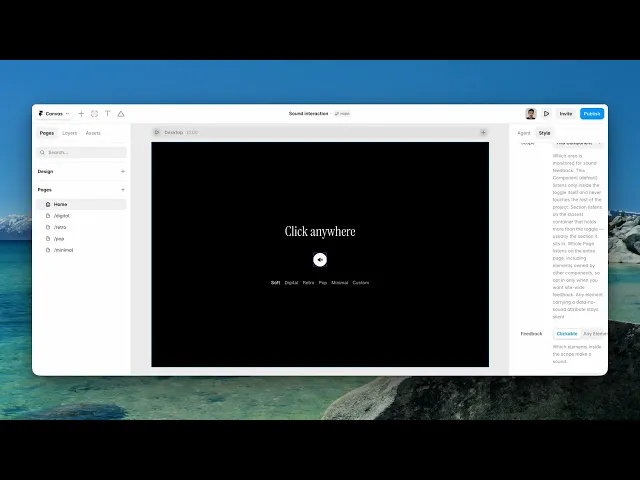
It adds a click and hover sound to your site, and a button that lets visitors turn it off.
That second half is the important half. Sound on a website is a strong choice, and it only works if leaving is easy.
Controls
26 controls, 8 of which only appear when they are relevant.
Control | Type | Default | Notes |
|---|---|---|---|
Preset | Enum | Soft / Digital / Retro / Pop / Minimal / Custom — default | — |
Click Sound | File | — | conditional |
Hover Sound | File | — | conditional |
Volume | Number |
| 0–100% |
Scope | Enum | This Component / Section / Whole Page — default | Which area is monitored for sound feedback. This Component (default) listens only inside the toggle itself and never touches the rest of the project. Section listens on the closest container that holds more than the toggle — usually the section it sits in. Whole Page listens on the entire page, including elements owned by other components, so opt in only when you want site-wide feedback. Any element carrying a data-no-sound attribute stays silent. |
Feedback | Enum | Clickable / Any Element — default | Which elements inside the scope make a sound. |
Click Sound | Boolean |
| — |
Hover Sound | Boolean |
| — |
Start Muted | Boolean |
| — |
Remember | Boolean |
| Persist the mute state across pages and reloads. |
Variant | Enum | Icon / Pill — default | — |
Icon | Enum | Speaker / Music / Bell / Waveform / Power / Custom — default | — |
Icon On | ResponsiveImage | — | conditional |
Icon Off | ResponsiveImage | — | conditional |
Icon Size | Number |
| .5–1.6 |
Label On | String |
| conditional |
Label Off | String |
| conditional |
Size | Number |
| 32–96px · conditional |
Background | Color |
| — |
Icon Color | Color |
| — |
Muted Color | Color |
| — |
Radius | Number |
| 0–999px |
Border | Border | — | — |
Shadow | Boolean |
| — |
Hover Scale | Number |
| 1–1.3 |
Font | Font |
| conditional |
Working through the panel
Scope — read this one carefully
Scope decides what makes a sound, and getting it wrong affects your whole site.
This Component is the default and the safest: only the toggle itself makes a noise. Section listens on the container it sits in. Whole Page listens on everything, including elements owned by other components.
Only reach for Whole Page when you genuinely want site-wide feedback, and understand that it means every click a visitor makes — including on form fields — produces a sound.
Feedback narrows it further: clickable elements only, or any element at all. Clickable is almost always what you want.
The sounds
Preset gives you five tuned sound sets — soft, digital, retro, pop and minimal. They're synthesised rather than loaded, so none of them cost you a download.
Choose Custom and two file fields appear so you can upload your own click and hover sounds.
Volume defaults to sixty percent, and lower is better than you'd think. Interface sound should be barely noticed; anything you'd describe as audible is too loud.
Click Sound and Hover Sound can each be turned off independently. Turning hover off is worth considering — a sound on every cursor pass is a lot more sound than a sound on every click.
The button
Start Muted decides the first impression. Off means sound plays before anyone asked for it, which some visitors will resent — starting muted is the more considerate default, at the cost of most people never hearing it.
Remember stores the choice across pages and reloads, so a visitor who mutes stays muted. Leave it on.
Then the button itself: icon or pill variant, five built-in icons or your own images, size, colours, radius, border, shadow and hover scale. On the pill variant, label text and a font appear.
Performance and limits
Static rendering is handled, so canvas thumbnails and exports show a settled frame rather than a blank box.
The visitor's choice is stored in their own browser. It does not follow them to another browser or device, and clearing storage resets it.
Good to know
No setup or coding required. Responsive across desktop, tablet, and mobile.
Refund policy — due to the nature of digital products, all sales are final. Once purchased, this component is non-refundable. Please make sure it fits your needs before completing the checkout.
Support: hi@alicorak.com





