Documentation
What it does
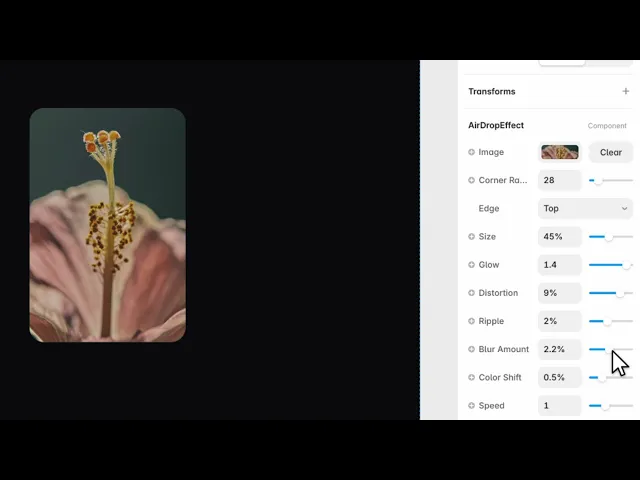
The component takes an image and lays a moving wavefront of light over it. The light does not sit still — it sweeps out from the edge you pick, and as it crosses the image it distorts, ripples and tints what is beneath it, then fades.
It is a WebGL effect, so the distortion is real: the image is being warped by the shader, not covered by a gradient. That is why it reads as light passing through the surface rather than a glow pasted on top.
Where you would use it
App screenshots and device mockups, where a still image otherwise sits dead on the page
Feature cards — one card carrying the effect draws the eye without any layout change
Hero images, with Speed low so it reads as ambience rather than animation
It works best on images with some tonal range. A flat, near-white screenshot gives the light nothing to bend.
How to add it
Paste the component onto your canvas.
Set Image.
Match Corner Radius to the rest of your design.
Pick the Edge the light travels from.
The image is drawn to cover the frame, so give the component the aspect ratio you want and crop from there.
Controls
Content
Control | Type | Default | Notes |
|---|---|---|---|
Image | Image | — | The picture the effect runs over. |
Corner Radius | Number |
| 0–200. Match your card radius. |
Direction
Control | Type | Default | Notes |
|---|---|---|---|
Edge | Top / Bottom / Left / Right |
| Which edge the wavefront starts from. |
Pick the edge that points at whatever the image relates to on the page. A card whose text sits below the image reads better with the light coming from the bottom, because the motion carries the eye toward the words.
The light
Control | Type | Default | Notes |
|---|---|---|---|
Size | Number |
| 10–90%. How far across the image the band reaches. |
Glow | Number |
| 0–1.5. Brightness of the band. |
Blur Amount | Number |
| 0–5%. Softness of its edges. |
Size is the control that changes the character most. Under about 25 it reads as a scan line. Over about 70 the whole image is lit and the effect becomes a wash — striking once, tiring on a page you scroll past often.
Distortion
Control | Type | Default | Notes |
|---|---|---|---|
Distortion | Number |
| 0–12%. How much the image bends under the light. |
Ripple | Number |
| 0–5%. Waviness within the band. |
Color Shift | Number |
| 0–2%. Iridescent tint at the band's edges. |
These three are what separate this from a moving gradient. Set all three to zero and you have a plain sweep; the defaults are deliberately restrained, and the effect tolerates being pushed further than you would expect on photographic images and much less on text-heavy screenshots, where distortion makes copy look broken.
Motion
Control | Type | Default | Notes |
|---|---|---|---|
Speed | Number |
| 0–3. How fast the band travels. |
Pulse | Number |
| 0–1. Rhythmic brightness variation. |
Play On Hover | Boolean |
| Run only while the cursor is over it. |
Play On Hover is the setting to reach for on a busy page. With several effects animating at once the page starts to feel restless; making them respond to the cursor instead turns the same effect into an interaction.
Tips
Lower the Speed for heroes, raise it for cards. A hero is on screen for a long time and a fast sweep becomes a distraction; a card is glanced at, so the sweep has to complete while the visitor is looking.
Corner Radius has to match the container, not approximate it. A 2px mismatch against a neighbouring card is visible.
Colour Shift is the first control to raise if the effect looks flat — it costs nothing visually and adds the iridescence that sells the "light through glass" reading.
Performance and limits
The animation loop pauses when the component scrolls out of the viewport, so several instances on one page do not compete for frames while off screen.
It is a WebGL component, so it does not render in the static canvas preview — a still frame stands in until the page runs.
The image is drawn to cover the frame. Set the frame to the crop you want rather than trying to fit the image inside it.
Good to know
No setup or coding required. Responsive across desktop, tablet, and mobile.
Refund policy — due to the nature of digital products, all sales are final. Once purchased, this component is non-refundable. Please make sure it fits your needs before completing the checkout.
Support: hi@alicorak.com




