Documentation
What it does
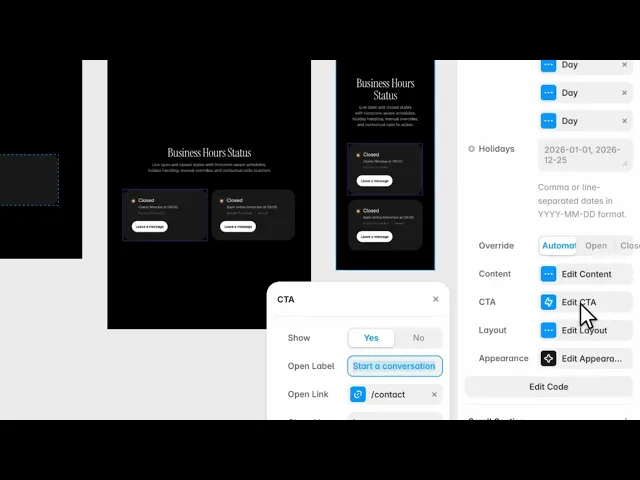
It shows whether you're open right now, when you next open or close, and a call to action that changes depending on the answer.
The status is computed from your schedule and your timezone — not typed in and left to go stale.
Controls
38 controls, 2 of which only appear when they are relevant.
Control | Type | Default | Notes |
|---|---|---|---|
Timezone | String |
| Use an IANA timezone name, such as America/New_York. |
Weekly Hours | Array |
| — |
Day | Enum |
| — |
Open | Boolean |
| — |
Opens | String |
| — |
Closes | String |
| — |
Holidays | String | — | Comma or line-separated dates in YYYY-MM-DD format. |
Override | Enum | Automatic / Open / Closed — default | — |
Open Note | String |
| conditional |
Closed Note | String |
| conditional |
Open Label | String |
| — |
Closed Label | String |
| — |
Opens Prefix | String |
| — |
Closes Prefix | String |
| — |
Holiday Label | String |
| — |
Timezone Label | Boolean |
| — |
Show | Boolean |
| — |
Open Label | String |
| — |
Open Link | Link |
| — |
Closed Label | String |
| — |
Closed Link | Link |
| — |
CTA Tap | EventHandler | — | — |
Direction | Enum | Horizontal / Vertical — default | — |
Align | Enum | Start / Center / End — default | — |
Gap | Gap |
| — |
Background | Color |
| — |
Text | Color |
| — |
Muted | Color |
| — |
Border | Color |
| — |
Open | Color |
| — |
Closed | Color |
| — |
CTA Fill | Color |
| — |
CTA Text | Color |
| — |
Radius | BorderRadius |
| — |
Padding | Padding |
| — |
Status Font | Font |
| — |
Detail Font | Font |
| — |
CTA Font | Font |
| — |
Working through the panel
The schedule
Timezone is yours, not the visitor's. That's the right way round: your opening hours are a fact about where you are, and the component works out what that means for whoever is looking.
Weekly Hours is a list with an entry per day — the day, whether you're open, and the opening and closing times.
Holidays takes dates you're closed regardless of the weekly pattern.
And Override forces the answer: automatic, open, or closed. Choosing open or closed reveals a note field, so you can explain why — temporarily closed, or open by appointment. That's your switch for a snow day or a week off, without editing the schedule.
Wording
The Content group holds every string: the open and closed labels, the prefixes for opens and closes, a holiday label, and whether to show the timezone.
Show the timezone. The whole point of a status like this is for someone in another country, and Opens at nine without saying nine where is not information.
The call to action
The CTA group is what makes this more than a status badge. It has separate labels and links for open and closed.
That separation is the feature. When you're open, the button says start a conversation and goes to your contact form. When you're closed, it says leave a message and can go somewhere else entirely.
A visitor arriving outside your hours gets an action that acknowledges it rather than one that promises an immediate reply.
There's a CTA Tap event handler too. Then the Layout group — direction, alignment, gap — and Appearance, which holds every colour including separate Open and Closed status colours, plus radius, padding and three fonts.
Good to know
No setup or coding required. Responsive across desktop, tablet, and mobile.
Refund policy — due to the nature of digital products, all sales are final. Once purchased, this component is non-refundable. Please make sure it fits your needs before completing the checkout.
Support: hi@alicorak.com




