Documentation
What it does
It counts how many items are in a CMS collection and prints the number on your page.
That sounds like it should be trivial, and it isn't — Framer code components can't read your collections directly. So this one works differently, and understanding how is the whole video.
Controls
8 controls, 6 of which only appear when they are relevant.
Control | Type | Default | Notes |
|---|---|---|---|
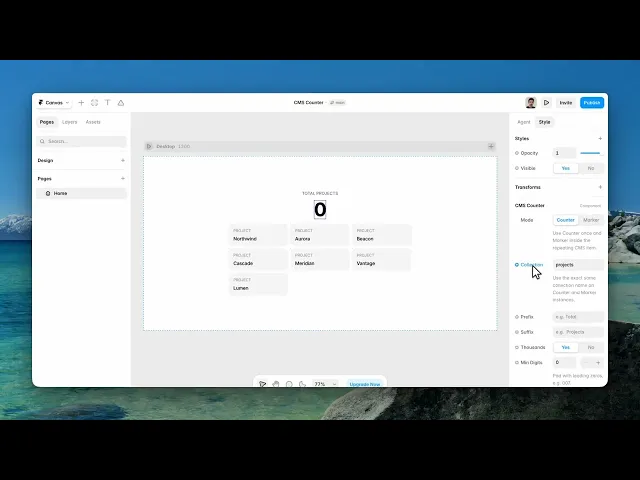
Mode | Enum | Counter / Marker — default | Use Counter once and Marker inside the repeating CMS item. |
Collection | String |
| Use the exact same collection name on Counter and Marker instances. |
Prefix | String | — | conditional |
Suffix | String | — | conditional |
Thousands | Boolean |
| conditional |
Min Digits | Number |
| 0–8 · Pad with leading zeros, e.g. 007. · conditional |
Font | Font |
| conditional |
Color | Color |
| conditional |
Working through the panel
How it works
It comes in two modes, and you need both.
Marker goes inside your collection list, once per item. It renders nothing visible — it just leaves a trace on the page for each item.
Counter goes wherever you want the number, and counts those traces.
The two find each other by sharing a Collection name, so give both the same name. If you have several collections on one page, that name is what keeps them apart.
Formatting the number
The remaining controls only appear in Counter mode, because in Marker mode there is nothing to style.
Prefix and Suffix are the words around the number — projects, articles, items in stock.
Thousands adds separators for large counts. Min Digits pads shorter numbers with leading zeros, which is how you get an odometer look.
Then font and colour.
Performance and limits
Static rendering is handled, so canvas thumbnails and exports show a settled frame rather than a blank box.
Good to know
No setup or coding required. Responsive across desktop, tablet, and mobile.
Refund policy — due to the nature of digital products, all sales are final. Once purchased, this component is non-refundable. Please make sure it fits your needs before completing the checkout.
Support: hi@alicorak.com




