Documentation
What it does
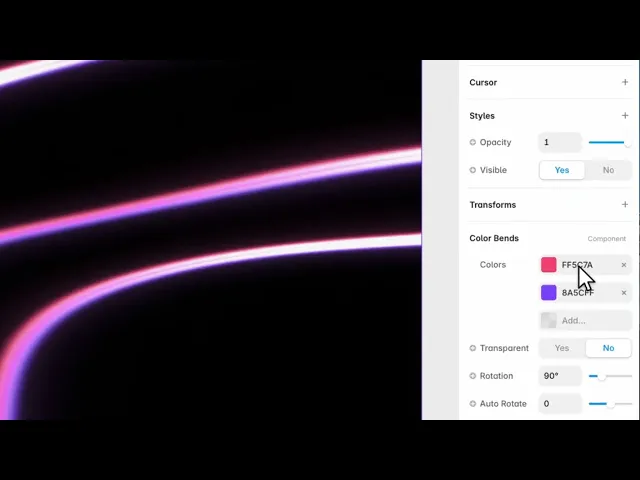
Bands of colour bent through a field, with a bright core where they converge and chromatic fringing at the edges.
It reacts to the cursor and it can render on transparency, which means it layers over whatever is already on your page rather than replacing the background.
Controls
16 controls.
Control | Type | Default | Notes |
|---|---|---|---|
Colors | Array |
| — |
Transparent | Boolean |
| — |
Rotation | Number |
| 0–360° |
Auto Rotate | Number |
| -90–90 · Rotation speed in degrees per second. |
Speed | Number |
| 0–2 |
Scale | Number |
| .1–3 |
Frequency | Number |
| 0–3 |
Warp | Number |
| 0–3 |
Iterations | Number |
| 1–5 · More ribbon groups for a denser composition. |
Intensity | Number |
| 0–3 |
Band Width | Number |
| 1–16 |
Hue Cycle | Number |
| 0–180 · Palette hue rotation in degrees per second. |
Edge Fade | Number |
| 0–.5 |
Mouse | Number |
| 0–2 |
Parallax | Number |
| 0–2 |
Noise | Number |
| 0–1 |
Working through the panel
Transparency and colour
Transparent is on by default and it's the control that decides how you use this. On, the effect composites over your existing background — so it works as an overlay on an image or a section. Off, it fills the frame with its own opaque field.
Colors is the list the bands are built from. Because they're bent and layered, three or four strong colours read better than a long list of similar ones.
And Hue Cycle slowly rotates the whole palette over time, which keeps a static section alive without any other movement.
Shaping the bands
Frequency is how many bands there are. Band Width is how thick each one is. Warp is how much they're bent out of straight.
Iterations stacks the effect on itself, up to five — each pass adds complexity and cost, so raise it only while watching what it actually buys you.
Intensity is the overall brightness, and Noise breaks up the bands so they don't look mathematically clean.
Rotation sets the angle, and Auto Rotate slowly turns the whole field over time.
Interaction and edges
Mouse is how strongly the field responds to the pointer, and Parallax adds depth as the visitor moves — the layers shifting at different rates.
Edge Fade softens the effect toward the frame boundary. On an overlay this matters a lot: without it you get a visible rectangle of effect sitting on your page, and with it the effect dissolves into what's underneath.
Speed drives the whole thing, and zero freezes it.
Performance and limits
It stops rendering when it scrolls out of view, so an instance below the fold costs nothing until the visitor reaches it.
Static rendering is handled, so canvas thumbnails and exports show a settled frame rather than a blank box.
It renders with WebGL at whatever size and pixel density the frame needs — there is no image to download and no resolution to outgrow.
Good to know
No setup or coding required. Responsive across desktop, tablet, and mobile.
Refund policy — due to the nature of digital products, all sales are final. Once purchased, this component is non-refundable. Please make sure it fits your needs before completing the checkout.
Support: hi@alicorak.com




