Documentation
What it does
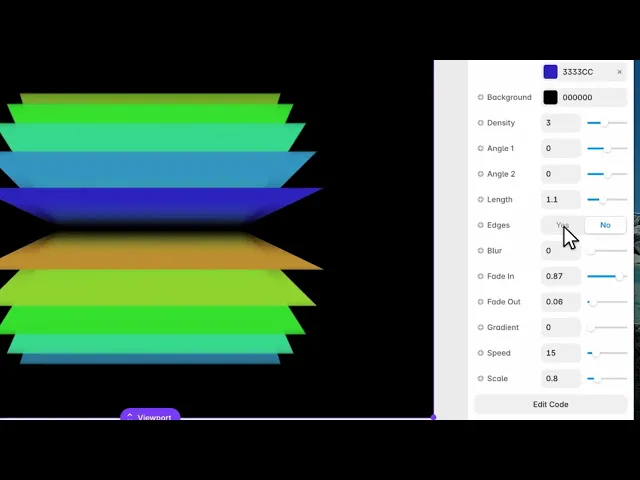
Bands of colour laid across the frame like strips of paper, with soft edges and a printed quality to them.
It's a background made of flat colour rather than gradients, which makes it unusually good behind type — there's no bright area drifting through your headline.
Controls
13 controls.
Control | Type | Default | Notes |
|---|---|---|---|
Colors | Array |
| — |
Background | Color |
| — |
Density | Number |
| .25–7 |
Angle 1 | Number |
| -1–1 |
Angle 2 | Number |
| -1–1 |
Length | Number |
| 0–3 |
Edges | Boolean |
| — |
Blur | Number |
| 0–.5 |
Fade In | Number |
| 0–1 |
Fade Out | Number |
| 0–1 |
Gradient | Number |
| 0–1 |
Speed | Number |
| — |
Scale | Number |
| .01–4 |
Working through the panel
The bands
Colors is your list, over a Background.
Density is how many bands fill the frame. Low gives a few broad strips; high packs them into stripes.
Length is how far each band travels — short lengths leave gaps where the background shows through, which reads as torn paper rather than as a continuous field.
And there are two angle controls rather than one. Angle 1 and Angle 2 set a range, so the bands aren't all parallel. Set them the same and you get a regular striped field; set them apart and the bands fan, which looks hand-placed.
Edges
Fade In and Fade Out control how each band begins and ends — hard or soft at each end independently.
The defaults are asymmetric on purpose: bands arrive fully and taper away. That asymmetry is what stops them reading as machine-drawn rectangles.
Edges is a toggle that adds definition where bands overlap. And Blur softens everything, which pushes the whole thing from paper toward light.
Gradient and motion
Gradient starts at zero, which means each band is a flat colour. Raise it and colour varies along each band's length.
Zero is the more distinctive setting. Flat colour is what makes this look like cut paper; add gradient and it starts to look like every other soft background.
Speed drifts the bands, and Scale sizes the whole composition.
Performance and limits
Static rendering is handled, so canvas thumbnails and exports show a settled frame rather than a blank box.
Good to know
No setup or coding required. Responsive across desktop, tablet, and mobile.
Refund policy — due to the nature of digital products, all sales are final. Once purchased, this component is non-refundable. Please make sure it fits your needs before completing the checkout.
Support: hi@alicorak.com




