Documentation
What it does
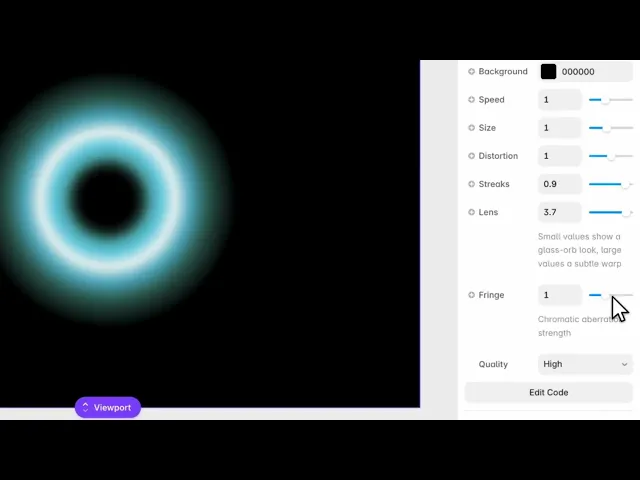
A glowing form at the centre of the frame that pulses and folds, with light streaking off it and colour fringing at its edges.
It's built to look like something photographed through a lens rather than drawn — which is where most of its controls go.
Controls
10 controls.
Control | Type | Default | Notes |
|---|---|---|---|
Color A | Color |
| Inner ring pulse |
Color B | Color |
| Outer ring pulse |
Background | Color |
| — |
Speed | Number |
| 0–3 |
Size | Number |
| .4–2 |
Distortion | Number |
| 0–2 |
Streaks | Number |
| 0–1 |
Lens | Number |
| .3–4 · Small values show a glass-orb look, large values a subtle warp |
Fringe | Number |
| 0–3 · Chromatic aberration strength |
Quality | Enum | Low / Medium / High — default | — |
Working through the panel
Colour and form
Two colours build the bloom and a third sits behind it. They blend through each other, so pick two that are genuinely different in hue — two similar colours give you a shape with no internal depth.
Size is how much of the frame it fills. Distortion is how far it's pushed out of a regular shape; at zero it's close to a clean orb, raised it starts to fold and churn.
Speed is the movement, and zero freezes it.
The lens
Three controls exist to make this look like optics.
Streaks are the flares that shoot off the bright areas — the anamorphic look. Lens is the strength of the bloom itself, how far the glow spreads beyond the form. And Fringe is chromatic aberration, the colour separation at high-contrast edges.
These three are what sell it. A glowing shape without them looks like a gradient; with them it looks like it was captured.
Quality
Quality has three settings and it's a genuine trade, not a nicety. High looks best and costs the most to render. Low is noticeably rougher but much cheaper.
The rule of thumb: High for a hero the visitor lands on, Medium or Low for anything decorative further down the page, and Low if the component is going anywhere near a phone.
Performance and limits
It stops rendering when it scrolls out of view, so an instance below the fold costs nothing until the visitor reaches it.
Static rendering is handled, so canvas thumbnails and exports show a settled frame rather than a blank box.
It renders with WebGL at whatever size and pixel density the frame needs — there is no image to download and no resolution to outgrow.
Good to know
No setup or coding required. Responsive across desktop, tablet, and mobile.
Refund policy — due to the nature of digital products, all sales are final. Once purchased, this component is non-refundable. Please make sure it fits your needs before completing the checkout.
Support: hi@alicorak.com




