Documentation
What it does
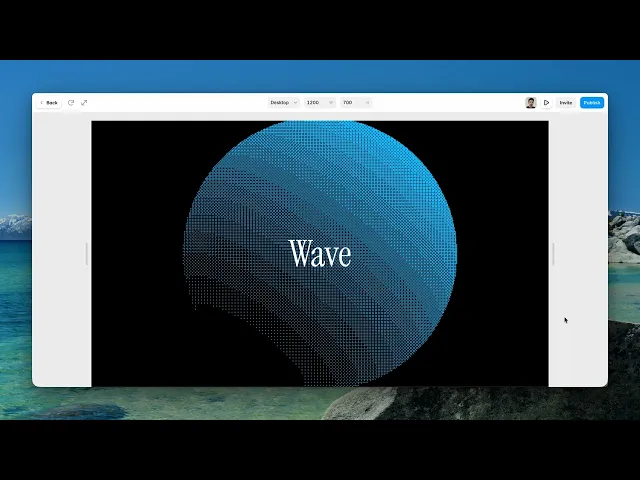
A two-colour field rendered as a dither pattern — the technique early computers used to fake extra shades with only a handful of colours.
So you get gradients made entirely of dots, which is why it reads as printed matter rather than as a screen.
Controls
11 controls.
Control | Type | Default | Notes |
|---|---|---|---|
Color Back | Color |
| — |
Color Front | Color |
| — |
Shape | Enum | simplex / warp / dots / wave / ripple / swirl / sphere — default | — |
Type | Enum | random / 2x2 / 4x4 / 8x8 — default | — |
Size | Number |
| 1–20 |
Speed | Number |
| — |
Scale | Number |
| .01–4 |
Rotation | Number |
| 0–360 |
Offset X | Number |
| -1–1 |
Offset Y | Number |
| -1–1 |
Fit | Enum | contain / cover — default | — |
Working through the panel
Shape and dither type
Shape is the underlying field: simplex, warp, dots, wave, ripple or swirl. That's what's being dithered, and it changes the composition completely — go through all six first.
Then Type, which is the dither pattern itself. Two by two is coarse and obviously mechanical. Four by four is the default and the most balanced. Eight by eight is fine enough to look almost smooth. And Random replaces the ordered grid with noise, which reads as grain instead of print.
Those two controls together are the whole identity.
Colour and size
Two colours, front and back. This component genuinely only has two — that's the constraint it's built on, and it's why it looks the way it does.
Size is how large each dither cell is. Small is subtle and closer to a real halftone; large makes the pattern the subject and pushes it toward pixel art.
Because everything is built from two colours and a pattern, the contrast between them does all the work. Two close colours give you a barely visible texture.
Framing
Scale zooms the field, rotation turns it, and the two offsets move it within the frame.
Fit is contain or cover, which matters here because the pattern is tied to the shape underneath it.
And Speed drifts the whole thing, with zero giving a still — which for this component is a perfectly good choice, since a printed texture doesn't necessarily want to move.
Performance and limits
It stops rendering when it scrolls out of view and when the browser tab is hidden, so an instance below the fold costs nothing until the visitor reaches it.
Static rendering is handled, so canvas thumbnails and exports show a settled frame rather than a blank box.
It renders with WebGL at whatever size and pixel density the frame needs — there is no image to download and no resolution to outgrow.
Good to know
No setup or coding required. Responsive across desktop, tablet, and mobile.
Refund policy — due to the nature of digital products, all sales are final. Once purchased, this component is non-refundable. Please make sure it fits your needs before completing the checkout.
Support: hi@alicorak.com




