Documentation
What it does
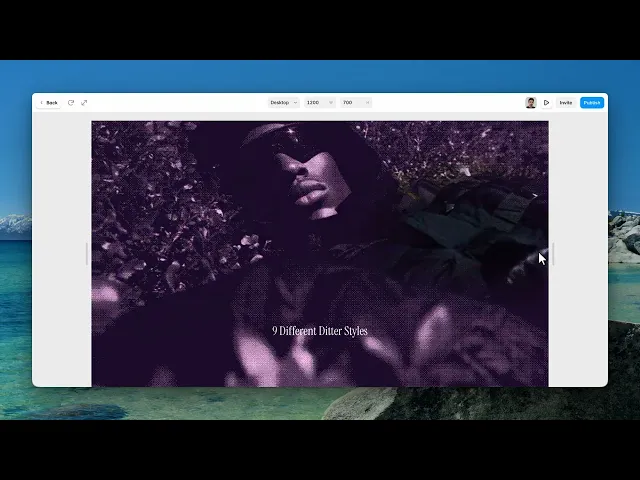
Your image sits under a dither pattern, and the cursor clears a soft window through it — so the picture is only fully visible where the visitor is looking.
The pattern itself also ripples, and clicking sends a wave out from the pointer.
Controls
15 controls, 4 of which only appear when they are relevant.
Control | Type | Default | Notes |
|---|---|---|---|
Image | ResponsiveImage | — | — |
Dither Style | Enum | Bayer 2×2 / Bayer 4×4 / Bayer 8×8 / Halftone Dots / Lines / Crosshatch / Blue Noise / Threshold / Posterize — default | The texture used to render the image. |
Reveal Size | Number |
| .05–.6 |
Reveal Softness | Number |
| 0–2 |
Dot Size | Number |
| .5–6 |
Wave Speed | Number |
| 0–2 |
Wave Density | Number |
| .5–10 |
Wave Strength | Number |
| 0–1 |
Cursor Ripple Size | Number |
| .05–.6 |
Click Ripple | Boolean |
| — |
Duotone | Boolean |
| Recolor the dither between two colors. |
Style | Enum | Midnight / Noir / Blueprint / Ember / Acid / Orchid / Custom — default | conditional |
Duotone Intensity | Number |
| 0–1 · conditional |
Shadow | Color |
| conditional |
Highlight | Color |
| conditional |
Working through the panel
The dither
Dither Style is the pattern: three sizes of Bayer matrix, halftone dots, lines, crosshatch, or blue noise.
They're genuinely different looks, not sizes of one look. Bayer reads as early computing. Halftone and crosshatch read as print. Blue noise reads as film grain because it has no visible grid.
Dot Size is how large each element of the pattern is. Larger is bolder and hides more of the image.
The reveal
Reveal Size is the diameter of the clear window under the cursor. Reveal Softness is how gradually it fades into the dithered area — high values make it feel like light falling on the image, low values make it a hard porthole.
Cursor Ripple Size is the disturbance the pointer makes in the pattern as it moves.
And Click Ripple, which is on by default, sends a wave outward when the visitor clicks. It's the small reward that makes people click a second time.
Waves and duotone
Three controls animate the pattern itself: Wave Speed, Wave Density and Wave Strength. Keep Strength low — the pattern should breathe, not churn, or it competes with the reveal.
Duotone is off by default. Turn it on and the image is recoloured into two tones, with a Style control offering midnight, noir, blueprint, ember, acid, orchid, or custom shadow and highlight colours.
Duotone plus dither is the combination that makes this look like a print rather than a photograph with a filter on it.
Performance and limits
It stops rendering when it scrolls out of view, so an instance below the fold costs nothing until the visitor reaches it.
Static rendering is handled, so canvas thumbnails and exports show a settled frame rather than a blank box.
It renders with WebGL at whatever size and pixel density the frame needs — there is no image to download and no resolution to outgrow.
Good to know
No setup or coding required. Responsive across desktop, tablet, and mobile.
Refund policy — due to the nature of digital products, all sales are final. Once purchased, this component is non-refundable. Please make sure it fits your needs before completing the checkout.
Support: hi@alicorak.com




