Documentation
What it does
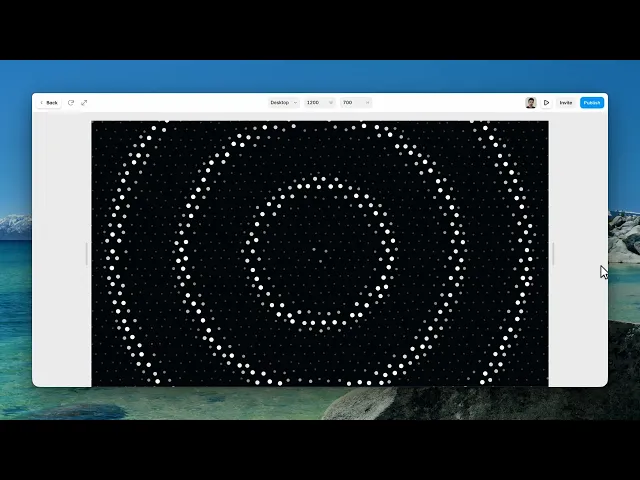
A grid of dots with a wave of light travelling through it — dots brightening and swelling as the pulse passes, then settling back.
So it's a dot grid that breathes, and the pattern of that breathing is the first thing you choose.
Controls
15 controls, 3 of which only appear when they are relevant.
Control | Type | Default | Notes |
|---|---|---|---|
Pattern | Enum | Ripple / Wave / Spiral / Breathe — default | — |
Background | Color |
| — |
Dots | Color |
| — |
Pulse | Color |
| — |
Spacing | Number |
| 8–80px |
Dot Size | Number |
| 1–20px |
Speed | Number |
| .05–2 |
Ring Gap | Number |
| 40–600px · Distance between pulse fronts |
Pulse Width | Number |
| .04–.4 |
Swell | Number |
| 0–4 · How much dots grow inside a pulse |
Push | Number |
| 0–40px · How far dots get displaced by a pulse |
Angle | Number |
| 0–360° · conditional |
Twist | Number |
| -8–8 · conditional |
Jitter | Number |
| 0–.5 · Per-dot timing randomness |
Follow Cursor | Boolean |
| conditional |
Working through the panel
Pattern
Four patterns. Ripple sends rings out from a point. Wave sweeps across in a straight line. Spiral turns. And Breathe pulses the whole field at once.
Each one brings its own control. Wave reveals an Angle, for the direction it sweeps. Spiral reveals a Twist, for how tightly it curls.
And Ripple and Spiral both reveal Follow Cursor, because both radiate from a point — so that point can be the visitor's pointer instead of the centre of the frame.
Follow Cursor is the one to try first. It turns a background into something the visitor is causing.
The grid
Spacing is the distance between dots and Dot Size is how big they are. Those two together set the density — and a fine grid of small dots reads as texture where a coarse grid of large ones reads as pattern.
Three colours: the background, the dots at rest, and the pulse colour they take on as the wave passes. The gap between the resting colour and the pulse colour is the whole effect, so make them clearly different.
The pulse
Speed is how fast the wave travels. Ring Gap is the distance between successive waves — large gaps mean one pulse at a time, small gaps mean a continuously rippling field.
Pulse Width is how wide each wave is. Swell is how much the dots grow as it passes, and Push is how far they're displaced from their grid position — that displacement is what makes the surface feel elastic rather than just lit.
And Jitter adds a small random offset to every dot, which stops the grid looking mechanical.
One last thing worth knowing. There's no control for it, and there doesn't need to be: the component automatically calms itself for visitors whose system asks for reduced motion.
Performance and limits
It stops rendering when it scrolls out of view, so an instance below the fold costs nothing until the visitor reaches it.
Visitors whose system asks for reduced motion get a calmer version automatically.
Static rendering is handled, so canvas thumbnails and exports show a settled frame rather than a blank box.
It renders with WebGL at whatever size and pixel density the frame needs — there is no image to download and no resolution to outgrow.
Good to know
No setup or coding required. Responsive across desktop, tablet, and mobile.
Refund policy — due to the nature of digital products, all sales are final. Once purchased, this component is non-refundable. Please make sure it fits your needs before completing the checkout.
Support: hi@alicorak.com




