Documentation
What it does
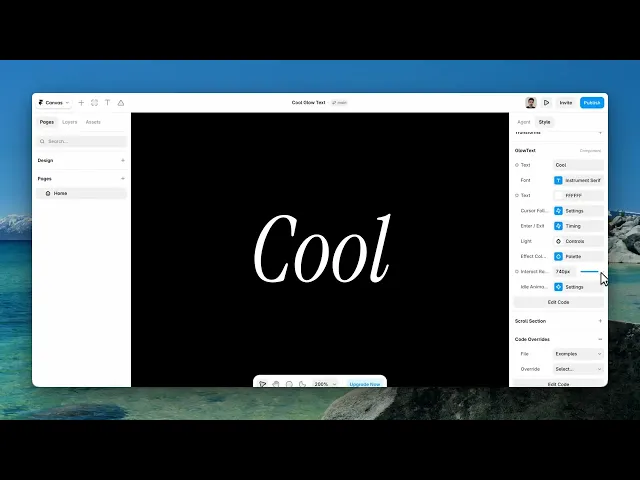
Your text sits in the dark and the cursor carries a light across it — letters catching colour as the light passes and falling back into shadow behind it.
The controls are grouped rather than listed, so the panel stays manageable despite there being a lot of them.
Controls
22 controls, 6 of which only appear when they are relevant.
Control | Type | Default | Notes |
|---|---|---|---|
Text | String |
| — |
Font | Font |
| — |
Text | Color |
| — |
Mode | Enum | Direct / Smooth — default | — |
Smoothness | Number |
| 1–24 · conditional |
Enter | Number |
| 0–3s |
Exit | Number |
| 0–3s |
Color | Color |
| — |
Size | Number |
| 2–35% |
Intensity | Number |
| .1–3 |
Mode | Enum | Spectrum / Mono / Custom — default | — |
Primary | Color |
| conditional |
Secondary | Color |
| conditional |
Tertiary | Color |
| conditional |
Saturation | Number |
| 0–200% |
Hue Shift | Number |
| -180–180° |
Rotation | Enum | Off / Follow / Continuous — default | — |
Tint Strength | Number |
| 0–100% |
Interact Radius | Number |
| 0–800px |
Enabled | Boolean |
| — |
Speed | Number |
| .01–.5 · conditional |
Orbit | Number |
| 0–60% · conditional |
Working through the panel
The light
The Light group holds three things: the colour of the light, its Size as a percentage of the frame, and its Intensity.
Size is the one that changes the character. Small makes visitors hunt across the word letter by letter. Large lights most of the text at once, which turns a reveal into a glow.
Interact Radius sets how far from the text the cursor still has an effect — so the light can begin arriving before the pointer is actually over a letter.
How it follows
Cursor Follow has two modes. Direct pins the light to the pointer exactly. Smooth makes it trail, and reveals a Smoothness control for how much.
Smooth is the better default. A light that lags slightly behind your hand reads as something with weight; one that's perfectly attached reads as a cursor graphic.
Enter and Exit are separate timings for how quickly the glow arrives and how slowly it fades. The default has the exit much slower than the enter, which is right — light arriving fast and dying slowly is how light actually behaves.
Colour and idle
Effect Colors is a group with a Mode: spectrum, mono, or custom. Custom reveals three colours.
Alongside those are Saturation, Hue Shift, and a Rotation setting — off, follow, or continuous. Follow rotates the colours based on cursor direction, continuous rotates them on its own. And Tint Strength blends the effect colour back into the base text.
Finally there's an Idle Animation group. That matters because without it the text is completely inert until someone happens to move a cursor over it — and most visitors never will. A gentle idle glow advertises that there's something here to interact with.
Performance and limits
It stops rendering when it scrolls out of view, so an instance below the fold costs nothing until the visitor reaches it.
Static rendering is handled, so canvas thumbnails and exports show a settled frame rather than a blank box.
It renders with WebGL at whatever size and pixel density the frame needs — there is no image to download and no resolution to outgrow.
Good to know
No setup or coding required. Responsive across desktop, tablet, and mobile.
Refund policy — due to the nature of digital products, all sales are final. Once purchased, this component is non-refundable. Please make sure it fits your needs before completing the checkout.
Support: hi@alicorak.com




