Documentation
What it does
It builds a moving colour field from a list you give it, and runs grain through the whole thing rather than laying grain on top.
That difference matters. Grain mixed into the gradient looks like film. Grain layered over it looks like a texture you added.
Controls
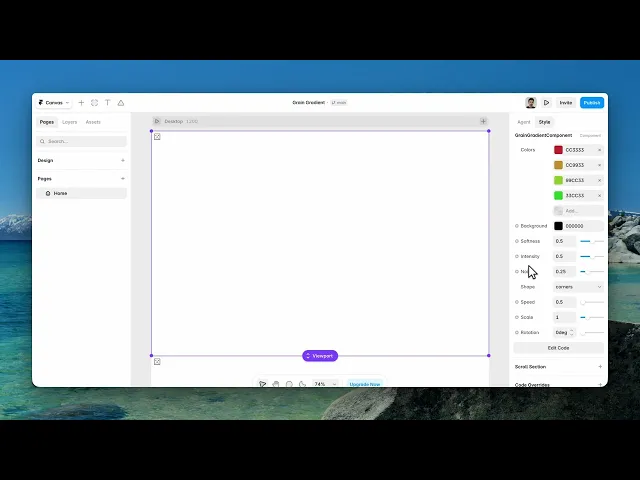
9 controls.
Control | Type | Default | Notes |
|---|---|---|---|
Colors | Array |
| — |
Background | Color |
| — |
Softness | Number |
| 0–1 |
Intensity | Number |
| 0–1 |
Noise | Number |
| 0–1 |
Shape | Enum | wave / dots / truchet / corners / ripple / blob / sphere — default | — |
Speed | Number |
| — |
Scale | Number |
| .01–4 |
Rotation | Number |
| 0–360deg |
Working through the panel
Shape
The Shape control is the biggest decision here, and it changes the component completely. Wave, dots, truchet, corners, ripple and blob.
They aren't variations of one look — they're six different backgrounds sharing a colour system. Corners is the default and the most neutral. Blob is the softest. Truchet is geometric and reads as pattern rather than atmosphere.
Go through all six before you tune anything else. It's much faster than trying to force one of them into being another.
Colour and texture
Colors is your list, Background is what sits behind them.
Softness is how sharply the colours meet — low gives you defined edges, high blurs them into each other.
Intensity is how strongly they show against the background.
And Noise is the grain amount. Even at low values it's doing real work: a smooth gradient across a large area shows banding, and the noise is what hides it.
Motion and framing
Speed is the drift, and zero freezes it into a still.
Scale zooms the pattern in and out, which changes the character as much as the shape control does — the same shape at low scale is a few big forms, at high scale it's a dense texture.
Rotation turns the whole field. It matters more than you'd expect on shapes with direction, like wave and corners.
Performance and limits
Static rendering is handled, so canvas thumbnails and exports show a settled frame rather than a blank box.
Good to know
No setup or coding required. Responsive across desktop, tablet, and mobile.
Refund policy — due to the nature of digital products, all sales are final. Once purchased, this component is non-refundable. Please make sure it fits your needs before completing the checkout.
Support: hi@alicorak.com




