Documentation
What it does
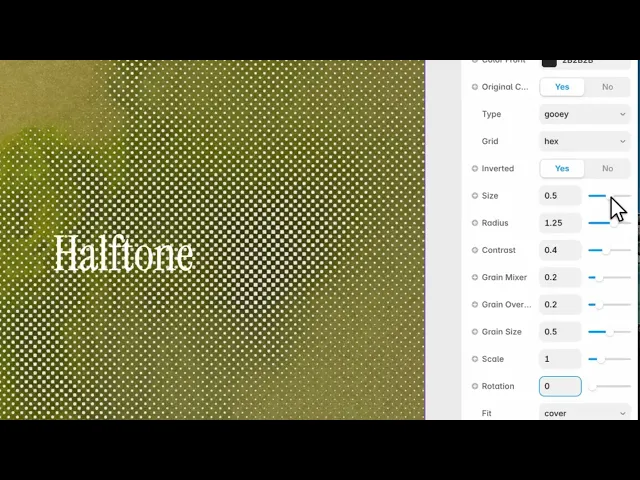
Your image rebuilt from dots that grow and shrink with brightness — the technique newspapers used to print photographs, and comics after them.
It's a strong look. The image survives, but it becomes clearly printed rather than photographic.
Controls
16 controls.
Control | Type | Default | Notes |
|---|---|---|---|
Image | Image | — | — |
Color Back | Color |
| — |
Color Front | Color |
| — |
Original Colors | Boolean |
| — |
Type | Enum | classic / gooey / holes / soft — default | — |
Grid | Enum | square / hex — default | — |
Inverted | Boolean |
| — |
Size | Number |
| 0–1 |
Radius | Number |
| 0–2 |
Contrast | Number |
| 0–1 |
Grain Mixer | Number |
| 0–1 |
Grain Overlay | Number |
| 0–1 |
Grain Size | Number |
| 0–1 |
Scale | Number |
| .01–4 |
Rotation | Number |
| 0–360 |
Fit | Enum | contain / cover — default | — |
Working through the panel
Type and grid
Type is the dot style: classic, gooey, holes or soft. Classic is the newspaper look. Gooey lets neighbouring dots merge into each other, which reads as ink bleeding. Holes inverts the logic so the dots are gaps. Soft blurs the edges.
Grid is square or hexagonal. Hex is the default and it's the right one — real halftone screens are angled precisely to avoid the moiré patterns a square grid produces, and hex sidesteps that.
Colour
Two colours by default, front and back, which gives you the classic two-tone print.
Turn on Original Colors and the dots take their colour from the photograph instead, which is closer to full-colour print.
Inverted swaps light and dark. Worth trying on every image — one of the two almost always reads better, and which one isn't predictable.
Dots and grain
Size is the spacing of the grid and Radius is how large each dot can grow. Contrast decides how sharply the dots respond to brightness — high contrast gives you solid black and solid white areas with a narrow band of dots between.
Then three grain controls: Grain Mixer blends grain into the result, Grain Overlay lays it on top, and Grain Size sets how coarse it is.
The grain matters more here than in most components. Real printed halftone sits on paper, and paper has texture — a perfectly clean halftone looks digital, which defeats the reference.
Performance and limits
Static rendering is handled, so canvas thumbnails and exports show a settled frame rather than a blank box.
Good to know
No setup or coding required. Responsive across desktop, tablet, and mobile.
Refund policy — due to the nature of digital products, all sales are final. Once purchased, this component is non-refundable. Please make sure it fits your needs before completing the checkout.
Support: hi@alicorak.com




