Documentation
What it does
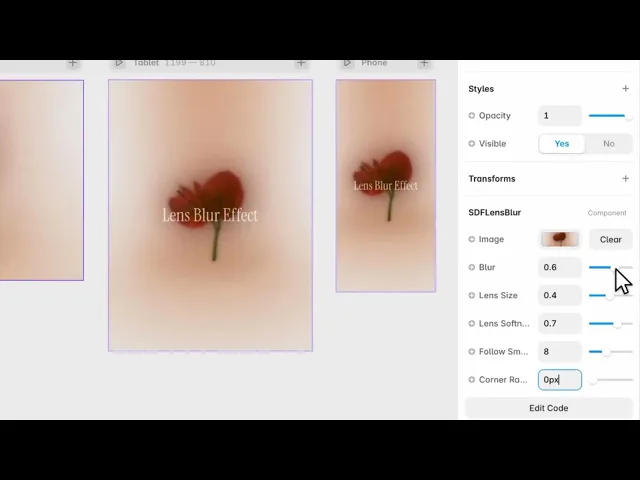
It blurs your image everywhere except under the cursor, where a soft circle stays sharp — as if you were moving a lens across a frosted surface.
The reveal follows the pointer with a little lag, so it glides rather than snapping.
Where you would use it
Portfolio pieces you want people to explore rather than just look at. Product shots where the detail is worth hunting for. Or a hero image that rewards a moment of play.
It asks the visitor to move their cursor, so put it where they're already looking — not below the fold where nobody will discover it.
This component creates a smooth, cursor-following blur effect that feels like looking through a real camera lens, making it perfect for modern portfolios, hero sections, product showcases, and creative websites.
Perfect for portfolios, creative agencies, landing pages, product showcases, photography websites, and interactive hero sections that need a subtle but premium visual effect.
Controls
6 controls.
Control | Type | Default | Notes |
|---|---|---|---|
Image | ResponsiveImage | — | — |
Blur | Number |
| 0–1 |
Lens Size | Number |
| .05–.8 |
Lens Softness | Number |
| .05–1 |
Follow Smoothing | Number |
| 1–20 |
Corner Radius | Number |
| 0–100px |
Working through the panel
The lens
Blur is how strong the blur is outside the lens. Push it high and the sharp circle becomes a genuine reveal; keep it low and the effect is more of a subtle focus.
Lens Size is the diameter of the sharp area. Small makes people work for it, which is good on a detailed image and frustrating on a simple one.
And Lens Softness is the edge. Low gives a hard-edged circle, which reads as a mask. High feathers it into the blur, which is what makes it look like optics rather than a cutout.
Following and shape
Follow Smoothing is how quickly the lens catches up with the cursor. Low is immediate and precise. High trails behind, which feels heavier and more liquid — but push it too far and it stops feeling connected to your hand.
Corner Radius rounds the component itself, so it matches whatever card or frame you've placed it in.
Performance and limits
It stops rendering when it scrolls out of view, so an instance below the fold costs nothing until the visitor reaches it.
Static rendering is handled, so canvas thumbnails and exports show a settled frame rather than a blank box.
It renders with WebGL at whatever size and pixel density the frame needs — there is no image to download and no resolution to outgrow.
Good to know
No setup or coding required. Responsive across desktop, tablet, and mobile.
Refund policy — due to the nature of digital products, all sales are final. Once purchased, this component is non-refundable. Please make sure it fits your needs before completing the checkout.
Support: hi@alicorak.com




