Documentation
What it does
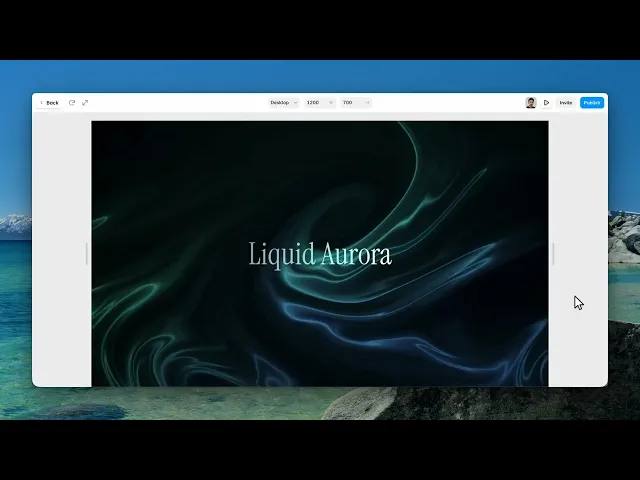
Bands of colour flowing and folding through each other like northern lights, with a glow that follows the cursor.
It starts from a palette rather than from individual colours, which makes it quick to get somewhere good.
Controls
11 controls, 4 of which only appear when they are relevant.
Control | Type | Default | Notes |
|---|---|---|---|
Palette | Enum | Custom / Aurora / Sunset / Mono / Ocean / Ember / Violet / Forest / Ice — default | — |
Color A | Color |
| conditional |
Color B | Color |
| conditional |
Accent | Color |
| conditional |
Speed | Number |
| 0–3 |
Distortion | Number |
| 0–1.5 |
Layers | Number |
| 1–12 |
Glow | Number |
| .02–.6 |
Vignette | Number |
| 0–1 |
Pointer | Boolean |
| — |
Pointer Force | Number |
| 0–3 · conditional |
Working through the panel
Palette
Six presets: aurora, sunset, mono, ocean, ember, and custom.
Go through the five presets before touching anything. They're tuned, and one of them is usually close to what you want.
Switch to Custom and three colour controls appear — two main colours and an accent. The accent is the bright edge that runs through the folds, so make it lighter and more saturated than the other two or it disappears into them.
The flow
Speed is how fast the bands move. Distortion is how much they fold — low gives smooth ribbons, high churns them into each other.
Layers is how many bands are stacked. More layers give depth and cost more to render; fewer read as simpler and more graphic.
Glow is the brightness bleed, and Vignette darkens the corners, which frames the whole thing and helps anything you place on top stay readable.
The pointer
Pointer is on by default, and it's what separates this from a background that ignores you — the aurora brightens and bends toward the cursor.
Pointer Force appears when it's on and sets how strongly. Keep it moderate. A background that reacts too eagerly pulls attention away from whatever you put in front of it, and this is meant to sit behind content.
Performance and limits
It stops rendering when it scrolls out of view, so an instance below the fold costs nothing until the visitor reaches it.
Static rendering is handled, so canvas thumbnails and exports show a settled frame rather than a blank box.
It renders with WebGL at whatever size and pixel density the frame needs — there is no image to download and no resolution to outgrow.
Good to know
No setup or coding required. Responsive across desktop, tablet, and mobile.
Refund policy — due to the nature of digital products, all sales are final. Once purchased, this component is non-refundable. Please make sure it fits your needs before completing the checkout.
Support: hi@alicorak.com




