Documentation
What it does
It shows how many people are on your site right now, with a pulsing dot beside the number.
It's social proof in its smallest form — and it comes in two modes that are genuinely different, so start there.
Where you would use it
Perfect for landing pages, launches, waitlists, SaaS products, and online events.
Controls
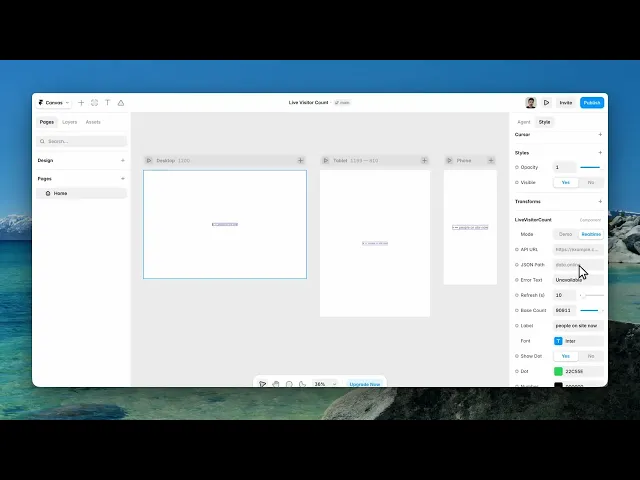
15 controls, 3 of which only appear when they are relevant.
Control | Type | Default | Notes |
|---|---|---|---|
Mode | Enum | Demo / Realtime — default | — |
API URL | String | — | conditional |
JSON Path | String | — | conditional |
Error Text | String |
| conditional |
Refresh (s) | Number |
| 1–300 |
Base Count | Number |
| 0–1e5 |
Label | String |
| — |
Font | Font |
| — |
Show Dot | Boolean |
| — |
Dot | Color |
| — |
Number | Color |
| — |
Label Color | Color |
| — |
Font Size | Number |
| 8–200 |
Gap | Number |
| 0–48 |
Layout | Enum | Horizontal / Vertical — default | — |
Working through the panel
Demo or Realtime
Demo mode shows a plausible number that drifts around a base you set. It is not real. It's there so you can design the component, and for sites where the number is decoration.
Be honest with yourself about using it in production. A fabricated visitor count is the kind of thing people notice, and it costs more trust than the number gains you.
Realtime mode is the real one. Switch to it and three controls appear: an API URL to fetch from, a JSON Path to find the number inside the response, and an Error Text for when the request fails.
Wiring up Realtime
The API URL is any endpoint that returns JSON with a count in it — your analytics provider's realtime API, or a small endpoint of your own.
JSON Path is how the component finds the number inside that response. If your endpoint returns an object with a visitors field nested under data, that's the path you give it.
Refresh is how often it asks, in seconds. Don't set this too low. Every visitor on your site is making this request on that interval, so a busy page with a one-second refresh is a lot of traffic for a number nobody is watching that closely.
Appearance
Label is the wording after the number. Show Dot adds the pulsing indicator, with its own colour — green reads as live, which is the convention worth following.
Then separate colours for the number and the label, a font, a size, the gap between elements, and a horizontal or vertical layout.
Set the label colour lighter than the number. The count is the information; the words are context.
Performance and limits
Static rendering is handled, so canvas thumbnails and exports show a settled frame rather than a blank box.
Good to know
No setup or coding required. Responsive across desktop, tablet, and mobile.
Refund policy — due to the nature of digital products, all sales are final. Once purchased, this component is non-refundable. Please make sure it fits your needs before completing the checkout.
Support: hi@alicorak.com




