Documentation
What it does
A number that counts up to its target — for statistics, milestones, and the numbers people put in a row on a homepage.
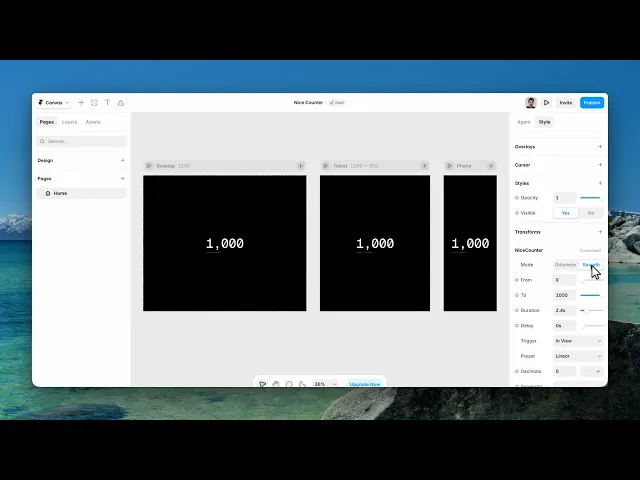
It has two modes that look completely different, so that's where to start.
Where you would use it
Perfect for animated stats, revenue numbers, user counts, performance metrics, social proof sections, and SaaS landing pages.
Controls
22 controls, 9 of which only appear when they are relevant.
Control | Type | Default | Notes |
|---|---|---|---|
Mode | Enum | Odometer / Smooth — default | — |
From | Number |
| — |
To | Number |
| — |
Duration | Number |
| .1–12s · conditional |
Delay | Number |
| 0–5s · conditional |
Trigger | Enum | In View / On Appear / On Scroll — default | — |
Preset | Enum | Smooth Ease / Snappy Ease / Ease In Out / Soft Spring / Back Overshoot / Bounce / Linear — default | conditional |
Decimals | Number |
| 0–3 |
Separator | String |
| — |
Prefix | String | — | — |
Suffix | String | — | — |
Loop | Boolean |
| conditional |
Reset | Boolean |
| conditional |
Align | Enum | Left / Center / Right — default | — |
Font | Font |
| — |
Color | Color |
| — |
Marks | Color |
| — |
Fade Mask | Boolean |
| conditional |
Credit | Boolean |
| — |
Text | String |
| conditional |
Credit Color | Color |
| conditional |
Credit Font | Font |
| conditional |
Working through the panel
Odometer or Smooth
Odometer rolls each digit like a mechanical counter — the digits physically travel. It's the more characterful of the two, and it reveals Marks and Fade Mask controls for the wheel styling.
Smooth simply counts, and it reveals a Preset control instead: smooth ease, snappy, ease in out, soft spring, back overshoot, bounce, or linear.
Odometer for a hero statistic you want people to watch. Smooth for a row of four numbers where the animation shouldn't be the point.
The count
From and To are the start and end. Duration is how long it takes, and Delay is a pause before it starts.
Trigger is In View, On Appear, or On Scroll. In View is the default and the right one for a statistics row — the number counts when the visitor reaches it, not while they're still three sections above.
On Scroll ties the count to the scroll position, so the visitor drives it themselves.
Decimals, Separator, Prefix and Suffix format the result — a currency symbol, a plus sign, a percentage.
Repeating and credit
Loop makes it count again, and Reset returns it to the start when it leaves view — so a visitor scrolling back up sees it happen again rather than finding it already finished.
Then alignment, font and colour.
And there's a Credit toggle with its own text, colour and font. It's off by default; turn it on if you want a line of attribution under the number.
Performance and limits
It stops rendering when it scrolls out of view, so an instance below the fold costs nothing until the visitor reaches it.
Static rendering is handled, so canvas thumbnails and exports show a settled frame rather than a blank box.
Good to know
No setup or coding required. Responsive across desktop, tablet, and mobile.
Refund policy — due to the nature of digital products, all sales are final. Once purchased, this component is non-refundable. Please make sure it fits your needs before completing the checkout.
Support: hi@alicorak.com




