Documentation
What it does
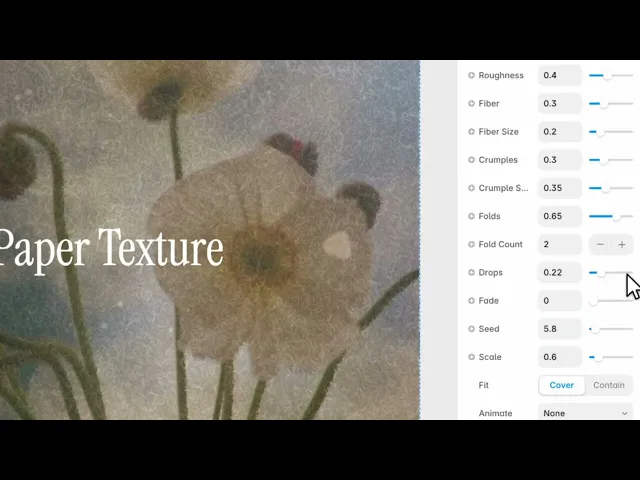
It puts your image onto paper — fibres, creases, folds and all — so a flat digital picture reads as something printed and handled.
The paper is generated rather than photographed, which means every instance is different and none of them tile.
Controls
18 controls, 1 of which only appear when they are relevant.
Control | Type | Default | Notes |
|---|---|---|---|
Image | ResponsiveImage | — | Optional — texture works without an image too |
Back | Color |
| — |
Front | Color |
| — |
Contrast | Number |
| 0–1 |
Roughness | Number |
| 0–1 |
Fiber | Number |
| 0–1 |
Fiber Size | Number |
| 0–1 |
Crumples | Number |
| 0–1 |
Crumple Size | Number |
| 0–1 |
Folds | Number |
| 0–1 |
Fold Count | Number |
| 1–15 |
Drops | Number |
| 0–1 |
Fade | Number |
| 0–1 |
Seed | Number |
| 0–100 |
Scale | Number |
| .01–4 |
Fit | Enum | Cover / Contain — default | — |
Animate | Enum | None / On Reveal / On Hover / Both — default | — |
Duration | Number |
| .2–4s · conditional |
Working through the panel
The surface
Roughness is the overall coarseness of the sheet.
Fiber and Fiber Size are the threads running through it — the detail you see when you hold paper up to light. Small fibres read as fine stock; large ones read as handmade or recycled.
Contrast controls how strongly the whole texture shows against your image. This is the one to keep low. Paper you notice is paper that's competing with the photograph on it.
Damage
Three controls age the sheet.
Crumples and Crumple Size add the soft creasing of paper that's been handled. Folds and Fold Count add straight creases, as if it had been folded and opened — the count is how many.
And Drops adds spots and stains.
Use these sparingly. One or two folds reads as a poster that was once in a pocket. Every control raised reads as a texture pack.
Composition and motion
Back and Front are the paper's own colours — the sheet and the marks on it. Moving Back off pure white toward a cream is the fastest way to make it look like real stock.
Seed changes the arrangement entirely without touching any settings. If a fold lands across a face, change the seed rather than adjusting the fold count.
Fade softens the effect toward the edges, and Scale sizes the texture relative to the image.
Animate offers none, on reveal, on hover or both, with a Duration control appearing when you pick one.
Performance and limits
It stops rendering when it scrolls out of view, so an instance below the fold costs nothing until the visitor reaches it.
Static rendering is handled, so canvas thumbnails and exports show a settled frame rather than a blank box.
Good to know
No setup or coding required. Responsive across desktop, tablet, and mobile.
Refund policy — due to the nature of digital products, all sales are final. Once purchased, this component is non-refundable. Please make sure it fits your needs before completing the checkout.
Support: hi@alicorak.com




