Documentation
What it does
Two colours blended through the noise function that most natural-looking textures in computer graphics are built on — clouds, terrain, marble, smoke.
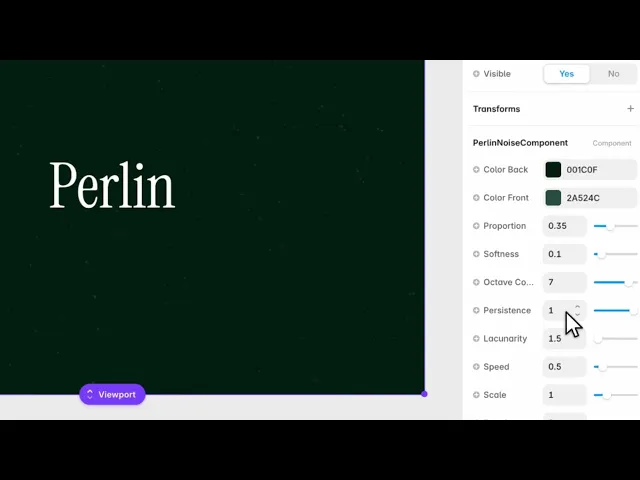
What makes this one worth understanding is that it exposes the actual noise parameters, not just a smoothness slider.
Controls
10 controls.
Control | Type | Default | Notes |
|---|---|---|---|
Color Back | Color |
| — |
Color Front | Color |
| — |
Proportion | Number |
| 0–1 |
Softness | Number |
| 0–1 |
Octave Count | Number |
| 1–8 |
Persistence | Number |
| .3–1 |
Lacunarity | Number |
| 1.5–10 |
Speed | Number |
| 0–4 |
Scale | Number |
| .01–4 |
Rotation | Number |
| 0–360 |
Working through the panel
Proportion and softness
Proportion is the balance between your two colours — how much of the frame belongs to the front colour rather than the back.
Softness is how sharply they meet. Near zero you get defined shapes with visible boundaries, which reads as marble or a map. Raised, the boundaries dissolve and it reads as cloud or vapour.
Those two get you most of the way. The next three are where it gets interesting.
Octaves, persistence, lacunarity
These three are the noise itself, and they're worth a minute.
Octave Count is how many layers of detail are stacked. One layer is smooth and simple. More layers add finer and finer detail on top, which is what turns a soft blob into something that looks like a real surface.
Persistence is how much each added layer contributes. Low keeps the fine layers faint, so the big shapes dominate. High lets the detail compete, which gets rough and busy.
And Lacunarity is how much finer each layer is than the one before. Higher values jump further between scales, giving a coarser, more broken texture.
Start by raising octaves to three or four, then use persistence to decide how much that detail matters.
Framing
Scale zooms the whole field, rotation turns it, and speed drifts it — with zero freezing it into a still image.
One practical note: raising octaves costs more to render than any other control here. If you need this on a large hero, get the look you want first and then see whether you can drop an octave without missing it.
Performance and limits
Static rendering is handled, so canvas thumbnails and exports show a settled frame rather than a blank box.
Good to know
No setup or coding required. Responsive across desktop, tablet, and mobile.
Refund policy — due to the nature of digital products, all sales are final. Once purchased, this component is non-refundable. Please make sure it fits your needs before completing the checkout.
Support: hi@alicorak.com




