Documentation
What it does
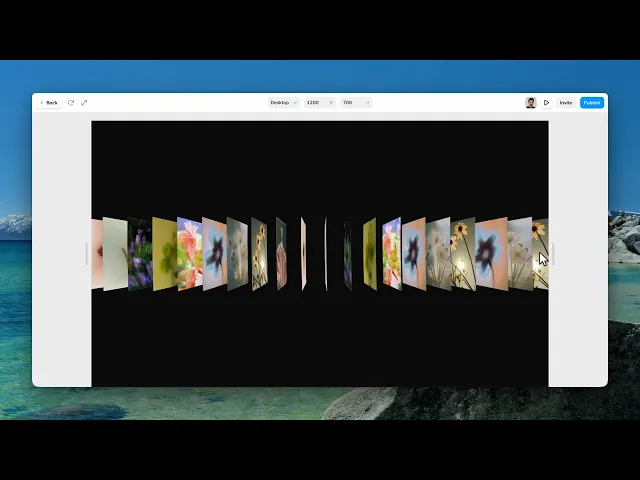
Your images stacked as pages in three-dimensional space, curling as you scroll through them — like flicking the corner of a thick book.
It takes over a section and turns scrolling into the act of turning pages.
Where you would use it
Perfect for portfolios, photography websites, product launches, lookbooks, fashion brands, art galleries, creative agencies, and immersive landing pages that deserve a memorable visual presentation.
Controls
16 controls, 2 of which only appear when they are relevant.
Control | Type | Default | Notes |
|---|---|---|---|
Pages | Array |
| — |
Background | Color |
| — |
Pages | Number |
| 4–60 |
Spacing | Number |
| .2–3 |
Scroll Speed | Number |
| .1–3 |
Grain | Number |
| 0–.5 |
Vignette | Number |
| 0–1 |
Aberration | Number |
| 0–3 |
Depth Fade | Number |
| 0–3 |
Scroll Curl | Boolean |
| — |
Curl Amount | Number |
| 0–2 · conditional |
Mouse Tilt | Boolean |
| — |
Tilt Amount | Number |
| 0–.6 · conditional |
Angle Y | Number |
| -60–60° |
Angle X | Number |
| -60–60° |
Auto Drift | Number |
| 0–4 |
Working through the panel
The stack
Pages is your list of images. There's also a Pages count — up to sixty — which is how many sheets are in the stack. Your images repeat through it, so a handful of pictures can fill a deep stack.
Spacing is the distance between sheets, and it changes the whole read. Tight spacing looks like a solid block of paper; wide spacing separates them into distinct floating planes.
Scroll Speed is how fast you travel through the stack per unit of scroll.
Curl and tilt
Scroll Curl is on by default and it's what makes this feel like paper — the sheets bend as they pass, with Curl Amount setting how much.
Mouse Tilt is off by default. Turn it on and the whole stack leans toward the cursor, with a Tilt Amount control. It adds presence but it also means the composition moves as visitors move, so it's a choice rather than an obvious win.
Angle X and Angle Y set the fixed viewing angle of the stack, and Auto Drift keeps it slowly turning even when nobody is scrolling.
Finish
Four controls handle the atmosphere.
Grain adds texture. Vignette darkens the corners. Depth Fade makes distant sheets recede into the background, which is what gives the stack its sense of scale.
And Aberration adds chromatic fringing at the edges of the sheets — the colour separation a real lens produces. A small amount makes the whole thing look photographed rather than rendered.
All four start at zero, so the component out of the box is clean and a bit clinical. These are where the character comes from.
Performance and limits
It stops rendering when it scrolls out of view, so an instance below the fold costs nothing until the visitor reaches it.
Static rendering is handled, so canvas thumbnails and exports show a settled frame rather than a blank box.
Good to know
No setup or coding required. Responsive across desktop, tablet, and mobile.
Refund policy — due to the nature of digital products, all sales are final. Once purchased, this component is non-refundable. Please make sure it fits your needs before completing the checkout.
Support: hi@alicorak.com




