Documentation
What it does
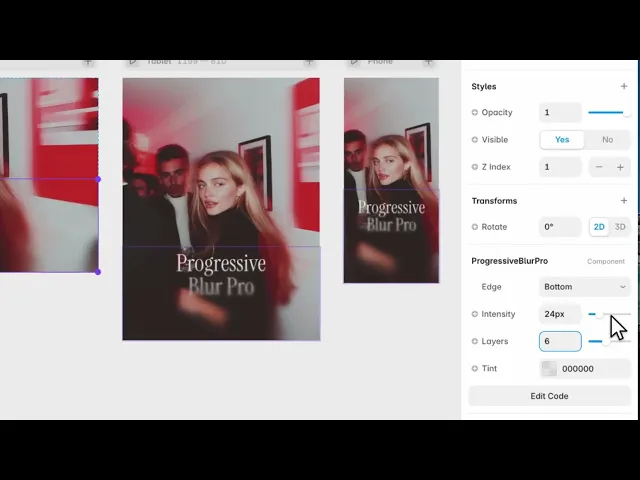
It blurs one edge of your layout, and the blur fades out gradually rather than stopping at a hard line.
That gradient is the whole point. A single blurred panel has an edge you can see; this one has none, so content appears to dissolve as it approaches the boundary.
Where you would use it
Under a sticky header, so text scrolling beneath it softens instead of colliding with it. Over a floating footer or a bottom navigation bar. Or along the edge of a scrolling gallery.
It exists to solve one problem: keeping content readable where something is layered over it, without hiding what's underneath.
Perfect for sticky navigation bars, floating footers, glass UI, overlays, drawers, modals, sidebars, and any layout where you need a smooth transition between content and interface elements.
Controls
4 controls.
Control | Type | Default | Notes |
|---|---|---|---|
Edge | Enum | Bottom / Top / Left / Right / Top & Bottom — default | — |
Intensity | Number |
| 0–120px |
Layers | Number |
| 2–12 |
Tint | Color |
| — |
Working through the panel
Edge and Intensity
Place the component over whatever you want to soften, then set Edge — bottom, top, left, right, or top and bottom together.
Intensity is how strong the blur gets at its strongest point. Keep it lower than feels right at first. The effect works best when a reader doesn't notice it's there, and a heavy blur announces itself.
Layers and Tint
Layers is how the gradient is built — more layers give a smoother falloff, fewer are cheaper to render. The default sits in a sensible place; raise it only if you can see banding across the fade.
Tint is transparent by default. Add a little of your background colour and the blur also darkens or lightens as it fades, which helps when the content underneath has strong contrast.
Good to know
No setup or coding required. Responsive across desktop, tablet, and mobile.
Refund policy — due to the nature of digital products, all sales are final. Once purchased, this component is non-refundable. Please make sure it fits your needs before completing the checkout.
Support: hi@alicorak.com




