Documentation
What it does
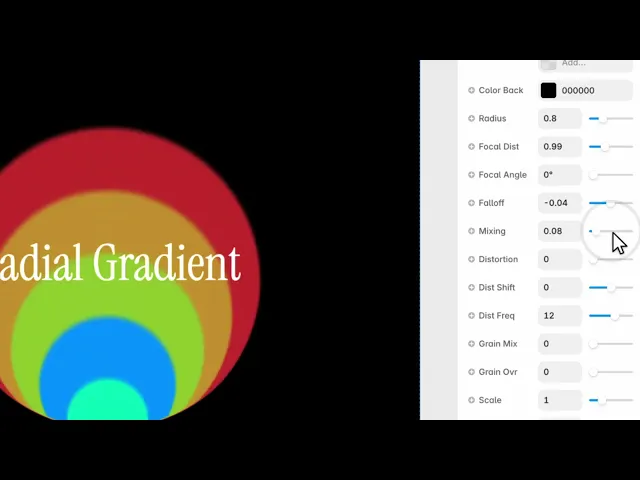
Colours radiating out from a point — but with real control over where that point is, how the colours fall off, and how much the whole thing is distorted.
It's the closest thing here to a plain gradient, which makes it the safest background to put content on.
Controls
14 controls.
Control | Type | Default | Notes |
|---|---|---|---|
Colors | Array |
| — |
Color Back | Color |
| — |
Radius | Number |
| 0–3 |
Focal Dist | Number |
| 0–3 |
Focal Angle | Number |
| 0–360° |
Falloff | Number |
| -1–1 |
Mixing | Number |
| 0–1 |
Distortion | Number |
| 0–1 |
Dist Shift | Number |
| -1–1 |
Dist Freq | Number |
| 0–20 |
Grain Mix | Number |
| 0–1 |
Grain Ovr | Number |
| 0–1 |
Scale | Number |
| .01–4 |
Rotation | Number |
| 0–360° |
Working through the panel
The focal point
Radius is how far the gradient reaches.
Then two controls decide where it comes from. Focal Distance moves the centre away from the middle, and Focal Angle sets the direction it moves in. Together they place the light source anywhere in or beyond the frame.
This is where the composition happens. A radial gradient centred exactly is symmetrical and inert; pushing the focal point into a corner gives the section a direction.
Falloff and mixing
Falloff is how quickly the colours fade with distance, and it can go negative — which inverts the curve so the colour concentrates at the edges instead of the centre.
Mixing is how the colours in your list blend into each other. Low keeps them as distinct bands; high smooths them into one continuous transition.
These two do most of the visual work once the focal point is placed.
Distortion and grain
Three controls bend the gradient out of a perfect circle. Distortion is how much, Distortion Shift moves where it happens, and Distortion Frequency is how many undulations there are.
A little distortion is worth adding. A mathematically perfect radial gradient looks like a default; a slightly irregular one looks designed.
Then the two grain controls — Grain Mix blends grain into the colour, Grain Overlay lays it on top. Both start at zero and both are worth raising a little, because a large smooth radial gradient is exactly the shape that shows banding on a big screen.
Performance and limits
It stops rendering when it scrolls out of view, so an instance below the fold costs nothing until the visitor reaches it.
Static rendering is handled, so canvas thumbnails and exports show a settled frame rather than a blank box.
Good to know
No setup or coding required. Responsive across desktop, tablet, and mobile.
Refund policy — due to the nature of digital products, all sales are final. Once purchased, this component is non-refundable. Please make sure it fits your needs before completing the checkout.
Support: hi@alicorak.com




