Documentation
What it does
It fills a section, a frame or a whole page with a colour picked at random — a different one on every visit.
It's a small idea that changes how a site feels. A page that looks slightly different each time reads as alive rather than printed.
Where you would use it
Behind a portfolio landing page, so returning visitors get a different mood. On a personal site, an experiment, a coming-soon page.
Anywhere the colour is decoration rather than meaning. Don't put it behind content that depends on a specific brand colour.
Controls
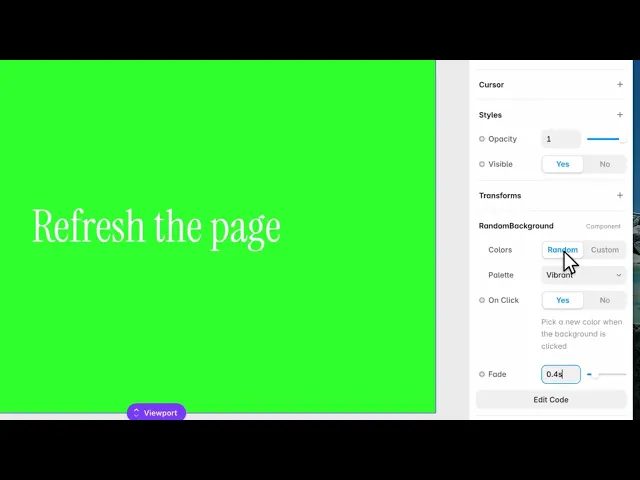
5 controls, 2 of which only appear when they are relevant.
Control | Type | Default | Notes |
|---|---|---|---|
Colors | Enum | Random / Custom — default | — |
Palette | Enum | Vibrant / Pastel / Deep / Any — default | conditional |
Color List | Array |
| conditional |
On Click | Boolean |
| Pick a new color when the background is clicked |
Fade | Number |
| 0–3s |
Working through the panel
Random or Custom
Colors is the first decision. On Random, a Palette control appears — vibrant, pastel, deep, or any — and the component generates a colour in that family.
Switch to Custom and the palette disappears, replaced by your own colour list. Add as many as you like and it picks from those instead.
Custom is the one to use for brand work. Random is for when you genuinely want surprise.
On Click and Fade
On Click is off by default. Turn it on and visitors can change the colour themselves by clicking the background — which turns a passive effect into something people play with.
Fade is how long the transition takes. At zero it snaps, which suits the click behaviour. Longer feels gentler on page load.
Good to know
No setup or coding required. Responsive across desktop, tablet, and mobile.
Refund policy — due to the nature of digital products, all sales are final. Once purchased, this component is non-refundable. Please make sure it fits your needs before completing the checkout.
Support: hi@alicorak.com




