Documentation
What it does
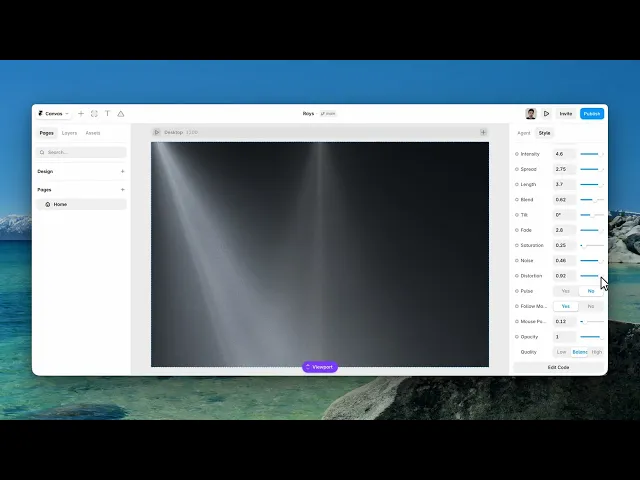
Beams of light crossing the frame from a source you place — the effect you get when strong light comes through a gap and catches whatever is in the air.
It follows the cursor, and it's built to sit behind content rather than in front of it.
Where you would use it
Rays Mixer simulates animated beams of light that spill across your layout, making it perfect for hero sections, product launches, portfolios, and immersive landing pages.
Controls
21 controls, 5 of which only appear when they are relevant.
Control | Type | Default | Notes |
|---|---|---|---|
Preset | Enum | Light Rays / Side Rays / Mixed — default | — |
Primary | Enum |
| conditional |
Side / Second | Enum |
| conditional |
Color A | Color |
| — |
Color B | Color |
| conditional |
Background | Color |
| — |
Speed | Number |
| 0–5 |
Intensity | Number |
| 0–5 |
Spread | Number |
| .1–3 |
Length | Number |
| .2–4 |
Blend | Number |
| 0–1 · conditional |
Tilt | Number |
| -90–90° |
Fade | Number |
| .2–3 |
Saturation | Number |
| 0–3 |
Noise | Number |
| 0–.5 |
Distortion | Number |
| 0–1 |
Pulse | Boolean |
| — |
Follow Mouse | Boolean |
| — |
Mouse Power | Number |
| 0–1 · conditional |
Opacity | Number |
| 0–1 |
Quality | Enum | Low / Balanced / High — default | — |
Working through the panel
Preset and direction
Preset comes first: light rays, side rays, or mixed.
Light rays come from a single source you set with the Primary control. Side rays come in from an edge. Mixed uses both, and reveals a Blend control for the balance between them, plus a second colour.
Mixed is the default and it's the most convincing, because real light rarely arrives from exactly one direction.
Tilt rotates the whole arrangement, which is often quicker than repositioning the source.
The light
Two colours over a background.
Intensity is brightness. Spread is how wide the beams fan out. Length is how far they reach. Fade is how they dissolve at their ends.
Saturation controls how much colour the light carries — high is theatrical, low is closer to daylight.
And two controls stop it looking synthetic: Noise adds grain within the beams, and Distortion bends them slightly out of straight. Both are set low by default and both are doing real work — perfectly straight, perfectly clean rays read as computer graphics.
Interaction and cost
Follow Mouse is on, with Mouse Power setting how much the light source drifts with the cursor. Keep it low — the default is deliberately subtle, because a light source that chases the pointer stops reading as light.
Pulse adds a slow breathing to the intensity.
Opacity fades the whole effect, which is the quickest way to sit it behind text.
And Quality has three settings. This is a real cost trade — beams of light are expensive to render. Use High on a hero, Balanced almost everywhere else.
Performance and limits
It stops rendering when it scrolls out of view, so an instance below the fold costs nothing until the visitor reaches it.
Static rendering is handled, so canvas thumbnails and exports show a settled frame rather than a blank box.
It renders with WebGL at whatever size and pixel density the frame needs — there is no image to download and no resolution to outgrow.
Good to know
No setup or coding required. Responsive across desktop, tablet, and mobile.
Refund policy — due to the nature of digital products, all sales are final. Once purchased, this component is non-refundable. Please make sure it fits your needs before completing the checkout.
Support: hi@alicorak.com




