Documentation
What it does
It lays a moving shadow over your layout — dappled light through leaves, mist, ripples, blinds — as if something outside the frame were casting it.
It's the cheapest way to make a flat digital surface feel like it exists in a room with light in it.
Controls
10 controls.
Control | Type | Default | Notes |
|---|---|---|---|
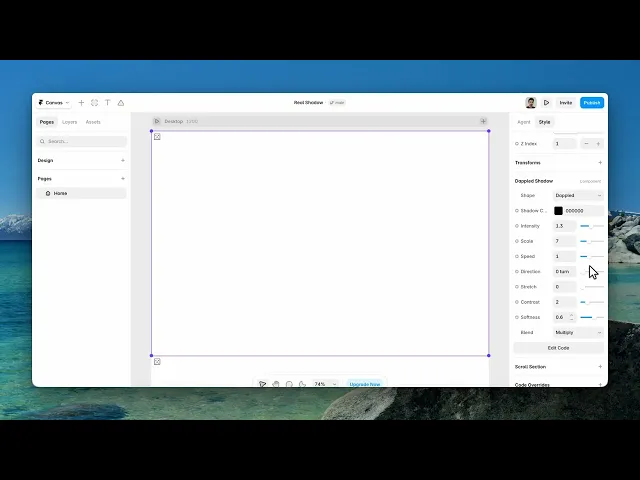
Shape | Enum | Dappled / Leaves / Mist / Ripples / Waves / Blinds / Window / Bokeh / Curtain / Marble — default | — |
Shadow Color | Color |
| — |
Intensity | Number |
| 0–3 |
Scale | Number |
| 1–20 |
Speed | Number |
| 0–3 |
Direction | Number |
| 0–1 turn |
Stretch | Number |
| 0–.95 |
Contrast | Number |
| 1–5 |
Softness | Number |
| 0–1 |
Blend | Enum | Multiply / Normal / Darken / Soft Light / Overlay — default | — |
Working through the panel
Shape and blend
Six shapes: dappled, leaves, mist, ripples, waves and blinds. Leaves and dappled read as outdoors. Blinds reads as an interior. Mist and waves are abstract enough to go anywhere.
Blend is how the shadow meets what's underneath, and Multiply is the default for a reason — it darkens without tinting, which is what a real shadow does. Soft Light is gentler. Normal ignores the content and lays the shape flat on top, which almost never looks like light.
Shaping the light
Scale is how large the pattern is. Direction rotates where the light appears to come from. Stretch elongates the shadow, which is what makes it read as a low sun rather than an overhead one.
Contrast is the gap between the lit and shadowed areas. High contrast is hard midday light; low is overcast.
And Softness blurs the edges. Real shadows are almost never sharp, so this is one to keep generous — a crisp-edged shadow reads as a graphic, not as light.
Intensity and speed
Intensity is how strong the whole effect is, and Shadow Color is what it's made of. Pure black is rarely right — real shadows carry the colour of the light around them, so a very dark blue or brown usually sits better.
Speed is the drift. Keep it slow. This is meant to read as light moving over a long period, and a shadow that visibly races across a page destroys the illusion instantly.
Performance and limits
It stops rendering when it scrolls out of view and when the browser tab is hidden, so an instance below the fold costs nothing until the visitor reaches it.
Static rendering is handled, so canvas thumbnails and exports show a settled frame rather than a blank box.
It renders with WebGL at whatever size and pixel density the frame needs — there is no image to download and no resolution to outgrow.
Good to know
No setup or coding required. Responsive across desktop, tablet, and mobile.
Refund policy — due to the nature of digital products, all sales are final. Once purchased, this component is non-refundable. Please make sure it fits your needs before completing the checkout.
Support: hi@alicorak.com




