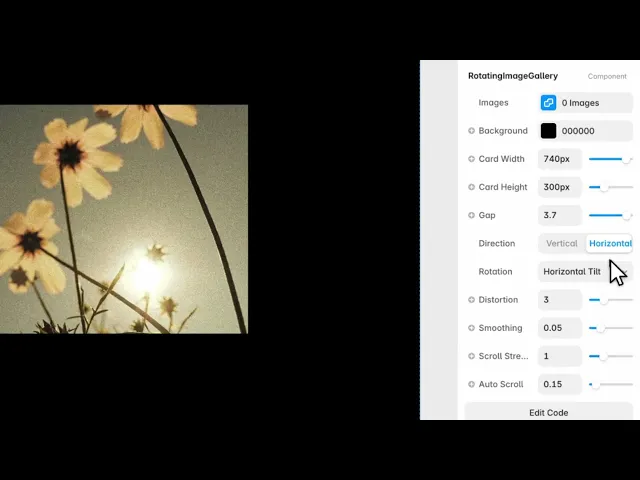
Documentation
What it does
An infinite scrolling strip of cards that rotate in three dimensions as they travel — so images turn away from you as they leave and turn toward you as they arrive.
It loops endlessly, so there's no beginning and no end to reach.
Where you would use it
Perfect for portfolios, creative agencies, product showcases, hero sections, galleries, and modern landing pages that need an engaging, motion-driven image presentation.
Controls
12 controls.
Control | Type | Default | Notes |
|---|---|---|---|
Images | Array |
| — |
Image | ResponsiveImage | — | — |
Background | Color |
| — |
Card Width | Number |
| 80–800px |
Card Height | Number |
| 80–800px |
Gap | Number |
| 0–4 |
Direction | Enum | Vertical / Horizontal — default | — |
Rotation | Enum | Vertical Flip / Horizontal Tilt / Diagonal — default | — |
Distortion | Number |
| 0–10 |
Smoothing | Number |
| .01–.2 |
Scroll Strength | Number |
| .2–3 |
Auto Scroll | Number |
| 0–2 |
Working through the panel
Layout
Images is your list. Card Width and Card Height set the size of each one, and Gap is the space between them.
Direction is whether the strip runs vertically or horizontally. Vertical suits a column beside content; horizontal suits a full-width band.
And Rotation is which axis the cards turn on — vertical flip, horizontal tilt, or diagonal. This is the control that sets the character, so try all three before settling.
The motion
Distortion is how strongly the cards bend as they move. Low keeps them nearly flat and the effect is subtle; high curls them dramatically, which looks striking and makes the images harder to actually see.
Scroll Strength is how much the strip moves per unit of scroll. Smoothing is how much lag there is between your scroll and the strip catching up — higher feels heavier and more expensive, lower feels direct.
Auto Scroll
Auto Scroll keeps the strip drifting even when nobody is scrolling, and it defaults to a slow crawl.
That default is a good one. A gallery that's completely still until touched can read as a static image, and visitors won't discover it moves. A slow drift advertises that it's interactive without demanding attention.
Set it to zero only when the section is already busy with other motion.
Performance and limits
It stops rendering when it scrolls out of view, so an instance below the fold costs nothing until the visitor reaches it.
Static rendering is handled, so canvas thumbnails and exports show a settled frame rather than a blank box.
It renders with WebGL at whatever size and pixel density the frame needs — there is no image to download and no resolution to outgrow.
Good to know
No setup or coding required. Responsive across desktop, tablet, and mobile.
Refund policy — due to the nature of digital products, all sales are final. Once purchased, this component is non-refundable. Please make sure it fits your needs before completing the checkout.
Support: hi@alicorak.com




