Documentation
What it does
Cards that rotate in three dimensions as you scroll, with the name of each item appearing alongside.
Seven different rotation effects share one component, so the first control decides most of the character.
Where you would use it
Ideal for portfolios, photography showcases, fashion lookbooks, editorial projects, creative agencies, and visual storytelling.
Controls
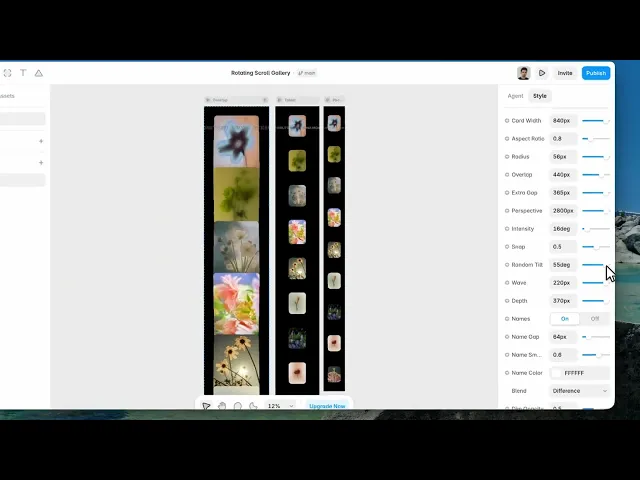
23 controls, 6 of which only appear when they are relevant.
Control | Type | Default | Notes |
|---|---|---|---|
Items | Array |
| — |
Name | String |
| — |
Image | ResponsiveImage | — | — |
Effect | Enum | Flip / Cube / Fan / Fold / Zoom / Swing / Helix — default | — |
Card Width | Number |
| 160–900px |
Aspect Ratio | Number |
| .4–2 |
Radius | Number |
| 0–60px |
Overlap | Number |
| 0–600px |
Extra Gap | Number |
| 0–400px |
Perspective | Number |
| 300–3e3px |
Intensity | Number |
| 0–180deg |
Snap | Number |
| 0–1 |
Random Tilt | Number |
| 0–60deg |
Wave | Number |
| 0–240px |
Depth | Number |
| 0–400px |
Names | Boolean |
| — |
Name Gap | Number |
| 0–400px · conditional |
Name Smooth | Number |
| 0–1 · conditional |
Name Color | Color |
| conditional |
Blend | Enum | Normal / Difference / Exclusion / Multiply / Screen / Overlay / Hard Light / Soft Light / Luminosity — default | conditional |
Dim Opacity | Number |
| 0–1 · conditional |
Name Font | Font |
| conditional |
Background | Color |
| — |
Working through the panel
The effect
Flip, cube, fan, fold, zoom, swing and helix.
Fan is the default — cards spreading like a hand of playing cards. Cube rotates them as faces of a solid. Helix winds them into a spiral. Fold creases them.
Intensity is how far the rotation goes, in degrees, and it's the partner control to the effect — the same effect at low intensity is a subtle tilt and at high intensity is a full somersault.
Items is your list, each with a name and an image.
Layout and feel
Card Width and Aspect Ratio size the cards, Radius rounds them.
Three controls set the spacing: Overlap lets cards sit on top of each other, Extra Gap pushes them apart, and Depth is how far they separate front to back.
Perspective is the strength of the 3D projection — low values exaggerate the depth dramatically, high values flatten it toward isometric.
Snap decides whether scrolling settles on a card or moves continuously. Wave adds a vertical offset so the row undulates, and Random Tilt gives each card a slightly different angle so the set doesn't look mechanical.
The names
Names is on by default and unlocks a group of its own.
Name Gap is the distance from the cards, Name Smooth is how much the name lags behind as you scroll, and there's a colour and a font.
Then Blend, which is the interesting one: normal, difference, exclusion, multiply, screen, overlay or hard light. Difference is the default and it means the name inverts against whatever passes behind it — so white text over a light image goes dark automatically, and stays readable without you managing it.
Dim Opacity fades the cards that aren't active, which pushes attention to the one in focus.
Performance and limits
It stops rendering when it scrolls out of view, so an instance below the fold costs nothing until the visitor reaches it.
Static rendering is handled, so canvas thumbnails and exports show a settled frame rather than a blank box.
Good to know
No setup or coding required. Responsive across desktop, tablet, and mobile.
Refund policy — due to the nature of digital products, all sales are final. Once purchased, this component is non-refundable. Please make sure it fits your needs before completing the checkout.
Support: hi@alicorak.com




