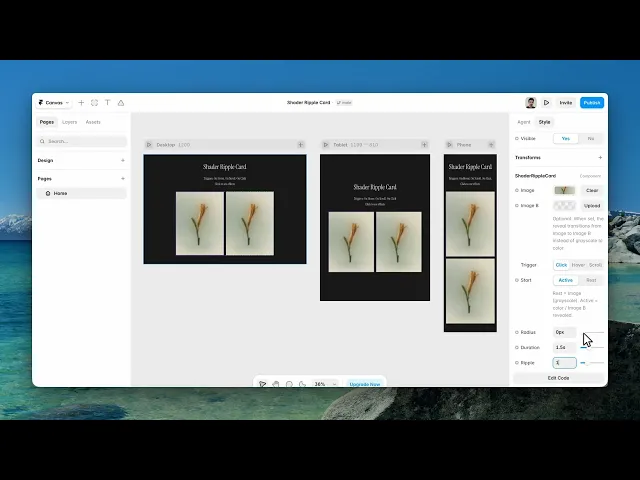
Documentation
What it does
It holds two images and swaps between them with a ripple that spreads out from the centre — the second image arriving underneath the wave rather than fading in over the first.
Where you would use it
Before-and-after shots. Product colourways. A card that shows a detail on interaction. Anywhere two images are related and you want the relationship to be felt rather than explained.
The two images should share a composition. If they're framed differently, the ripple reveals a mismatch instead of a transformation.
Perfect for portfolios, case studies, product cards, galleries, creative landing pages, and interactive image showcases that deserve a premium, memorable interaction.
Controls
7 controls.
Control | Type | Default | Notes |
|---|---|---|---|
Image | ResponsiveImage | — | — |
Image B | ResponsiveImage | — | Optional. When set, the reveal transitions from Image to Image B instead of grayscale to color. |
Trigger | Enum | Click / Hover / Scroll — default | — |
Start | Boolean |
| Rest = Image (grayscale). Active = color / Image B revealed. |
Radius | Number |
| 0–80px |
Duration | Number |
| .3–4s |
Ripple | Number |
| 0–4 |
Working through the panel
Trigger
Three ways to set it off. Click, which is deliberate and repeatable. Hover, which is effortless but fires accidentally as people move around a page. And Scroll, which runs it as the card comes into view.
Start decides which image you begin on, so you can have a card arrive already flipped.
Use Click for a card that's part of the content, and Scroll for one that's decoration.
Radius, Duration and Ripple
Radius matches the card to whatever it sits in.
Duration is how long the transition takes. Short is snappy but the ripple barely registers; long lets you see the wave but leaves the card unreadable while it runs. Somewhere around a second and a half is the sweet spot, which is where it starts.
And Ripple is how many waves travel out. One is a single clean sweep. Higher values give a rings-in-a-pond look, which suits water and product photography and rarely suits typography.
Performance and limits
It stops rendering when it scrolls out of view, so an instance below the fold costs nothing until the visitor reaches it.
Static rendering is handled, so canvas thumbnails and exports show a settled frame rather than a blank box.
It renders with WebGL at whatever size and pixel density the frame needs — there is no image to download and no resolution to outgrow.
Good to know
No setup or coding required. Responsive across desktop, tablet, and mobile.
Refund policy — due to the nature of digital products, all sales are final. Once purchased, this component is non-refundable. Please make sure it fits your needs before completing the checkout.
Support: hi@alicorak.com




