Documentation
What it does
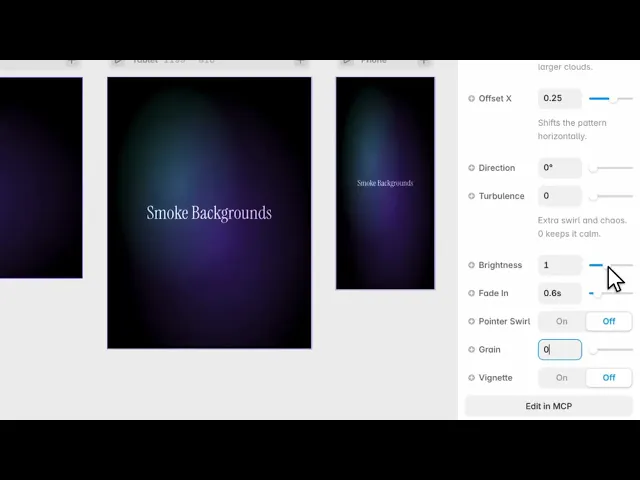
Volumetric smoke drifting across the frame — two smoke colours over a background, with real depth rather than a flat texture.
It's built to sit behind content, and it has more controls for staying out of the way than most backgrounds do.
Where you would use it
Built as a single WebGL shader, it renders crisp at any size and adapts to its container, making it perfect for hero sections, headers, cards, or full-screen backdrops.
Controls
16 controls, 2 of which only appear when they are relevant.
Control | Type | Default | Notes |
|---|---|---|---|
Smoke | Color |
| — |
Smoke 2 | Color |
| Set different from Smoke for a two-tone gradient; keep equal for a single color. |
Background | Color |
| — |
Quality | Enum | Low / Medium / High — default | — |
Speed | Number |
| .1–4 |
Scale | Number |
| .3–3 · Size of the smoke patterns. Lower = larger clouds. |
Offset X | Number |
| -2–2 · Shifts the pattern horizontally. |
Direction | Number |
| 0–360° |
Turbulence | Number |
| 0–.8 · Extra swirl and chaos. 0 keeps it calm. |
Brightness | Number |
| .4–2 |
Fade In | Number |
| 0–5s |
Pointer Swirl | Boolean |
| — |
Swirl | Number |
| 0–1 · conditional |
Grain | Number |
| 0–.2 |
Vignette | Boolean |
| — |
Vignette Amount | Number |
| 0–1 · conditional |
Working through the panel
The smoke
Two smoke colours and a background. Keeping the two smoke colours slightly different is what gives the volume — identical colours flatten it into fog.
Speed is the drift rate and Scale is how large the smoke forms are.
Direction sets which way it travels, and Offset X moves the source across the frame. Turbulence breaks up the flow so it churns rather than sliding — at zero the smoke moves in an even sheet, which reads as a gradient rather than as smoke.
Fitting it to a page
Brightness is the overall level.
Fade In is the time the smoke takes to appear when the page loads, in seconds. It defaults to just over half a second, and it's a detail worth keeping — smoke arriving abruptly at full strength looks like a rendering glitch.
Vignette darkens the corners, with an amount control appearing when you turn it on. And Grain adds texture, which does the usual job of hiding banding across a large dark area.
Quality and pointer
Quality has three settings and it's a genuine trade — volumetric smoke is one of the more expensive things to render. High for a hero, Low for anything decorative or anything going to a phone.
Pointer Swirl is off by default. Turn it on and the cursor stirs the smoke, with a Swirl control for how strongly.
Leaving it off is defensible here. This is a background that works by being ignored, and making it chase the cursor pulls attention it doesn't need.
Performance and limits
It stops rendering when it scrolls out of view, so an instance below the fold costs nothing until the visitor reaches it.
Static rendering is handled, so canvas thumbnails and exports show a settled frame rather than a blank box.
It renders with WebGL at whatever size and pixel density the frame needs — there is no image to download and no resolution to outgrow.
Good to know
No setup or coding required. Responsive across desktop, tablet, and mobile.
Refund policy — due to the nature of digital products, all sales are final. Once purchased, this component is non-refundable. Please make sure it fits your needs before completing the checkout.
Support: hi@alicorak.com




