Documentation
What it does
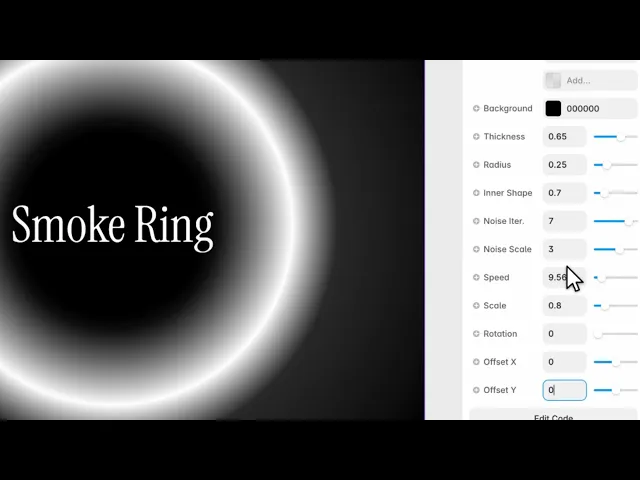
A ring of turbulent smoke that churns in place — a circular form with real internal movement, not a rotating image.
It reads as a portal, a halo, or an orbit, depending on what you put in the middle of it.
Controls
12 controls.
Control | Type | Default | Notes |
|---|---|---|---|
Colors | Array |
| — |
Background | Color |
| — |
Thickness | Number |
| .01–1 |
Radius | Number |
| 0–1 |
Inner Shape | Number |
| 0–4 |
Noise Iter. | Number |
| 1–8 |
Noise Scale | Number |
| .01–5 |
Speed | Number |
| — |
Scale | Number |
| .01–4 |
Rotation | Number |
| 0–360 |
Offset X | Number |
| -1–1 |
Offset Y | Number |
| -1–1 |
Working through the panel
The ring
Radius is how large the ring is, and Thickness is how much of it is filled — low gives a fine hoop, high closes it toward a disc.
Inner Shape controls what happens in the hole. At zero it's empty; raised, the smoke starts encroaching inward, which changes it from a ring into a churning mass with a bright centre.
Colors is your list, and Background is what it sits on. Dark backgrounds suit this best — smoke is defined by what it obscures, and it has nothing to obscure on white.
The smoke
Two controls make the smoke look like smoke.
Noise Iterations is how many layers of turbulence are stacked, up to eight. Low is smooth and reads as gas. High is intricate and reads as fire or fluid — and it's the most expensive control here, so on a large hero check whether you can drop one or two without noticing.
Noise Scale is how large those turbulent features are. Small gives fine wisps; large gives broad billows.
Placing it
Speed is the churn rate, and slow suits this — smoke that moves quickly reads as a video loop rather than as a live effect.
Scale zooms the whole thing, Rotation turns it, and the two offsets move it within the frame.
The offsets are the useful pair here. A ring centred exactly in a hero is symmetrical and a bit static; pushing it off to one side and letting the frame crop it usually looks better and leaves room for your text.
Performance and limits
Static rendering is handled, so canvas thumbnails and exports show a settled frame rather than a blank box.
Good to know
No setup or coding required. Responsive across desktop, tablet, and mobile.
Refund policy — due to the nature of digital products, all sales are final. Once purchased, this component is non-refundable. Please make sure it fits your needs before completing the checkout.
Support: hi@alicorak.com




