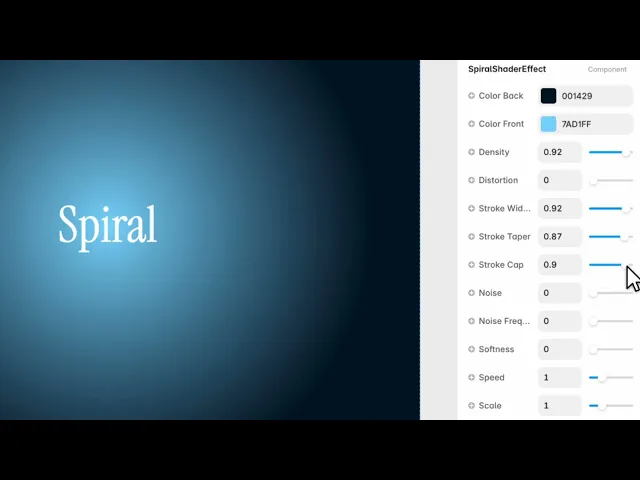
Documentation
What it does
A single line winding out from the centre, in two colours, drawn live.
It's the most geometric thing in the background collection — precise where the others are atmospheric — and that makes it useful in a different set of places.
Controls
15 controls.
Control | Type | Default | Notes |
|---|---|---|---|
Color Back | Color |
| — |
Color Front | Color |
| — |
Density | Number |
| 0–1 |
Distortion | Number |
| 0–1 |
Stroke Width | Number |
| 0–1 |
Stroke Taper | Number |
| 0–1 |
Stroke Cap | Number |
| 0–1 |
Noise | Number |
| 0–1 |
Noise Frequency | Number |
| 0–1 |
Softness | Number |
| 0–1 |
Speed | Number |
| 0–4 |
Scale | Number |
| .01–4 |
Rotation | Number |
| 0–360 |
Offset X | Number |
| -1–1 |
Offset Y | Number |
| -1–1 |
Working through the panel
The line
Density is how tightly the spiral winds. Low gives a few wide turns; high packs them into something that reads as a moiré pattern.
Stroke Width is the line thickness. And two controls shape the line along its length: Stroke Taper narrows it as it travels outward, and Stroke Cap shapes its ends.
Taper is the one worth using. A spiral of even thickness reads as machine-drawn; one that thins as it unwinds reads as a stroke someone made.
Breaking the geometry
Three controls stop it being perfectly regular.
Distortion pushes the spiral out of a true circle. Noise disturbs the line itself, and Noise Frequency sets how fine that disturbance is.
Softness blurs the whole thing, which turns a hard graphic line into something closer to light.
All four start at zero, so out of the box you get a clean, precise spiral. That's a good starting point — but adding a small amount of noise and distortion is what moves it from a diagram to a piece of design.
Placing it
Two colours, front and back.
Speed rotates it, and this is one where slow really matters — a fast-spinning spiral is genuinely uncomfortable to look at and can be a problem for anyone sensitive to motion.
Scale sizes it, Rotation sets the starting angle, and the two offsets move the centre. As with the other radial effects, pushing the centre off-frame usually composes better than leaving it dead centre.
Performance and limits
Static rendering is handled, so canvas thumbnails and exports show a settled frame rather than a blank box.
It renders with WebGL at whatever size and pixel density the frame needs — there is no image to download and no resolution to outgrow.
Good to know
No setup or coding required. Responsive across desktop, tablet, and mobile.
Refund policy — due to the nature of digital products, all sales are final. Once purchased, this component is non-refundable. Please make sure it fits your needs before completing the checkout.
Support: hi@alicorak.com




