Documentation
What it does
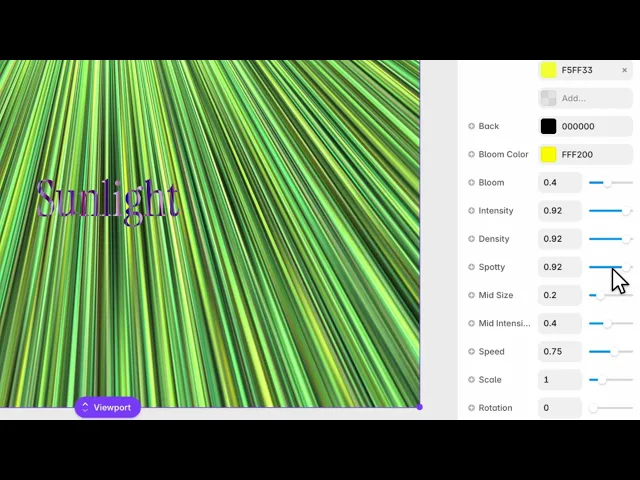
Shafts of light streaming across the frame — god rays, the beams you get when sun comes through a gap and catches the dust in the air.
It's built to sit behind or over a section and give it a direction and a source.
Where you would use it
Great for dramatic hero backgrounds, logo reveals, or sun-shaft/energy-burst effects.
Controls
15 controls.
Control | Type | Default | Notes |
|---|---|---|---|
Colors | Array |
| — |
Back | Color |
| — |
Bloom Color | Color |
| — |
Bloom | Number |
| 0–1 |
Intensity | Number |
| 0–1 |
Density | Number |
| 0–1 |
Spotty | Number |
| 0–1 |
Mid Size | Number |
| 0–1 |
Mid Intensity | Number |
| 0–1 |
Speed | Number |
| -4–4 |
Scale | Number |
| .01–4 |
Rotation | Number |
| 0–360 |
Offset X | Number |
| -1–1 |
Offset Y | Number |
| -1–1 |
Fit | Enum | Contain / Cover — default | — |
Working through the panel
The rays
Colors is the list the beams are made from, over a Back colour.
Intensity is how bright they are. Density is how many — low gives a few distinct shafts, high fills the frame with light.
Spotty is the one that makes it convincing. It breaks the beams up so they're uneven, the way real light is when it passes through leaves or a window frame. Perfectly smooth rays look computer-generated, and this control is what fixes that.
Bloom and mid layer
Bloom is the glow around the light source, with its own colour. Because it's separate from the ray colours, you can have warm beams with a cool halo — which is how light actually behaves and something a single-colour effect can't do.
Mid Size and Mid Intensity control a second layer of light between the source and the rays. It fills the space so the effect doesn't read as beams floating on a flat background.
Placing the source
This is where the composition happens. Offset X and Offset Y move the light source, and the vertical offset starts well above centre — because light usually comes from above.
Rotation turns the direction of the beams, and Scale sets how far they reach.
Speed can go negative, which reverses the drift. And Fit is contain or cover.
Spend your time on the two offsets. Where the light comes from decides everything else about how the section reads.
Performance and limits
Static rendering is handled, so canvas thumbnails and exports show a settled frame rather than a blank box.
Good to know
No setup or coding required. Responsive across desktop, tablet, and mobile.
Refund policy — due to the nature of digital products, all sales are final. Once purchased, this component is non-refundable. Please make sure it fits your needs before completing the checkout.
Support: hi@alicorak.com




