Documentation
What it does
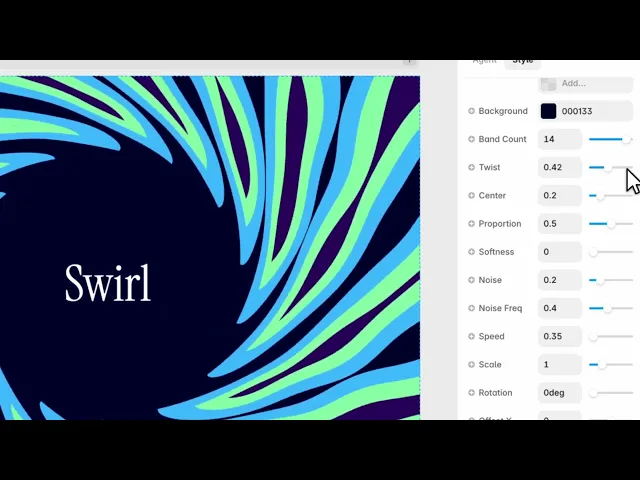
Bands of colour spiralling out from a centre point, with noise breaking them up so they read as liquid rather than as a graphic.
It's the most directional of the background shaders — everything points at one place, so it draws the eye there.
Controls
14 controls.
Control | Type | Default | Notes |
|---|---|---|---|
Colors | Array |
| — |
Background | Color |
| — |
Band Count | Number |
| 0–15 |
Twist | Number |
| 0–1 |
Center | Number |
| 0–1 |
Proportion | Number |
| 0–1 |
Softness | Number |
| 0–1 |
Noise | Number |
| 0–1 |
Noise Freq | Number |
| 0–1 |
Speed | Number |
| — |
Scale | Number |
| .01–4 |
Rotation | Number |
| 0–360deg |
Offset X | Number |
| -1–1 |
Offset Y | Number |
| -1–1 |
Working through the panel
The spiral
Band Count is how many rings of colour there are, from none up to fifteen. Low counts are bold and graphic; high counts blur into a continuous gradient.
Twist is how much they curl. At zero you get concentric rings; raised, they wind into a vortex.
Center is the size of the calm area in the middle. Open it up and you get a clear space — which is where you'd put a logo or a headline.
Colour and texture
Colors is the list, over a Background colour.
Proportion is how much of the frame the bands occupy against the background. Softness blurs the boundaries between them.
Then two noise controls. Noise is how much the bands are disturbed, and Noise Frequency is how fine that disturbance is. Together they're what turn clean spirals into something that looks stirred — without them this is a geometric pattern, with them it's fluid.
Placing it
Offset X and Offset Y move the centre of the spiral, and this is the control pair that matters most compositionally.
A swirl centred exactly in the frame is symmetrical and a bit inert. Pushing the centre off to one side, so the spiral runs out of frame, almost always looks better — and it leaves you an area of calmer colour to put content on.
Scale zooms, Rotation turns, and Speed drifts.
Performance and limits
Static rendering is handled, so canvas thumbnails and exports show a settled frame rather than a blank box.
Good to know
No setup or coding required. Responsive across desktop, tablet, and mobile.
Refund policy — due to the nature of digital products, all sales are final. Once purchased, this component is non-refundable. Please make sure it fits your needs before completing the checkout.
Support: hi@alicorak.com




