Documentation
What it does
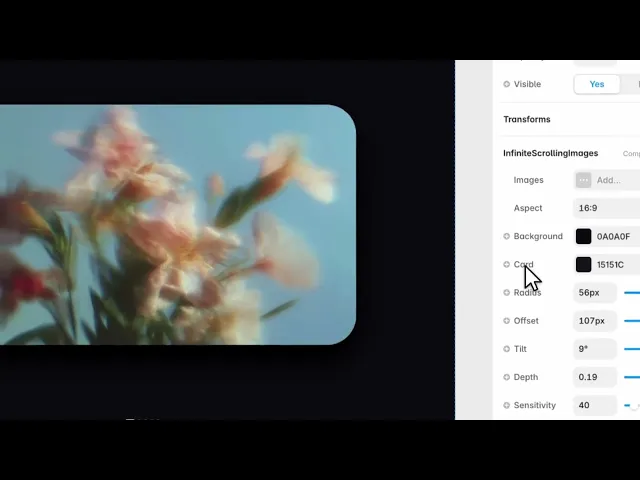
Your images stacked in depth, one behind the other, and you scroll through the stack — the front card leaving and the next one stepping forward.
It reads as flipping through a pile rather than sliding along a row, which is a different and more physical way to look at a set of images.
Controls
13 controls, 2 of which only appear when they are relevant.
Control | Type | Default | Notes |
|---|---|---|---|
Images | Array | — | — |
Source | Enum | Upload / URL — default | — |
Image | ResponsiveImage | — | conditional |
URL | String | — | conditional |
Aspect | Enum | 16:9 / 4:3 / 1:1 / 3:4 — default | — |
Background | Color |
| — |
Card | Color |
| — |
Radius | Number |
| 0–60px |
Offset | Number |
| 10–120px |
Tilt | Number |
| 0–10° |
Depth | Number |
| .02–.2 |
Sensitivity | Number |
| 10–200 |
Indicator | Boolean |
| — |
Working through the panel
Images
Images is your list. There's also a Source control on each entry — upload or URL — with the matching field appearing depending on which you pick. Uploads keep everything in the project; URLs keep the project light.
Aspect sets the shape of every card at once: sixteen by nine, four by three, square, or portrait. They all share one aspect, so pick the one your images actually are rather than cropping them into a shape they resist.
The stack
Offset is how far each card sits behind the one in front, which is how much of the stack you can see. Small offsets look like a tight deck; large ones fan the images out so several are readable at once.
Tilt rotates the cards slightly so the stack isn't perfectly square, and Depth is how much perspective there is.
Radius rounds the cards, and the Card and Background colours set what they and the space behind them are made of.
Scrolling
Sensitivity is how much scroll it takes to advance one card. Low means the stack races through as you scroll past; high means the visitor has to commit to it.
Get this wrong in either direction and the component fails — too fast and nobody sees the images, too slow and the page feels stuck. Test it on a trackpad as well as a wheel, because they deliver very different amounts of scroll.
Indicator shows the position in the stack, and it should stay on. Without it there's no way to tell how many images there are or how far through you've got.
Performance and limits
Static rendering is handled, so canvas thumbnails and exports show a settled frame rather than a blank box.
Good to know
No setup or coding required. Responsive across desktop, tablet, and mobile.
Refund policy — due to the nature of digital products, all sales are final. Once purchased, this component is non-refundable. Please make sure it fits your needs before completing the checkout.
Support: hi@alicorak.com




