Documentation
What it does
Small notifications that appear in a corner, stack when several arrive, and dismiss themselves.
It's the pattern every app uses to confirm something happened without interrupting what you're doing.
Controls
43 controls, 3 of which only appear when they are relevant.
Control | Type | Default | Notes |
|---|---|---|---|
Trigger Link | String |
| Set this as the link on any button or frame to show the toast. No nesting required. |
Type | Enum | Success / Error / Warning / Info / Loading / Custom — default | — |
Title | String |
| — |
Message | String |
| — |
Persistent | Boolean |
| — |
Action Label | String | — | — |
Action Link | Link | — | conditional |
Position | Enum | Top Left / Top Center / Top Right / Bottom Left / Bottom Center / Bottom Right — default | — |
Visible | Number |
| 1–8 |
Queue | Number |
| 1–30 |
Newest First | Boolean |
| — |
Duplicates | Enum | Allow / Ignore / Replace — default | — |
Duration | Number |
| 1–30s |
Pause Hover | Boolean |
| — |
Hover Expand | Boolean |
| — |
Always Expand | Boolean |
| — |
Stack Offset | Number |
| 3–18px · conditional |
Stack Scale | Number |
| 1–8% · conditional |
Icon | Boolean |
| — |
Close | Boolean |
| — |
Progress | Boolean |
| — |
Width | Number |
| 260–600 |
Offset | Number |
| 0–80 |
Radius | Number |
| 0–40 |
Padding | Number |
| 8–32 |
Icon Gap | Number |
| 0–24 |
Open Gap | Number |
| 0–24 |
Background | Color |
| — |
Text | Color |
| — |
Muted | Color |
| — |
Border | Color |
| — |
Shadow | BoxShadow |
| — |
Blur | Number |
| 0–40px |
Success | Color |
| — |
Error | Color |
| — |
Warning | Color |
| — |
Info | Color |
| — |
Loading | Color |
| — |
Title | Font | — | — |
Message | Font | — | — |
Action | Font | — | — |
Type | Enum | fade / slide / scale / pop / none — default | — |
Duration | Number |
| .1–1 |
Working through the panel
Firing one
Trigger Link is how a toast is summoned. You point any link or button at it, and clicking that element shows the toast instead of navigating.
Type is success, error, warning, info, loading or custom — each with its own icon and colour.
Title and Message are the content. Keep the title to a few words and put detail in the message, because in a stack of three only the titles get read.
Persistent stops it dismissing on its own, which is right for errors — a failure that vanishes before it's read is a failure the visitor doesn't know about.
And Action Label with Action Link adds a button, so a toast can offer undo or a way to fix what went wrong.
The stack
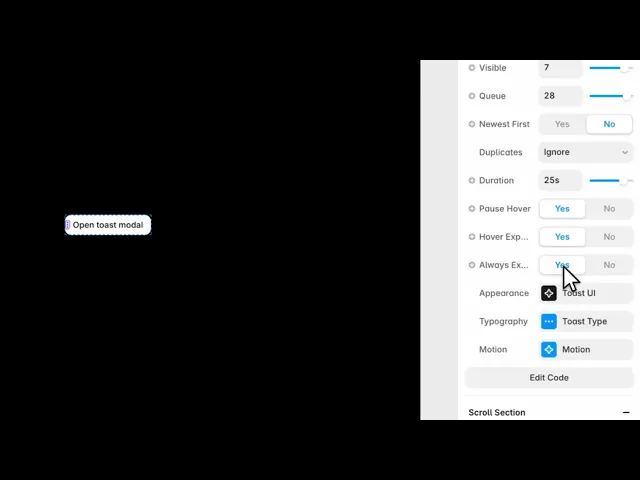
Position is one of six corners. Visible is how many show at once, Queue is how many wait behind them.
Newest First puts new toasts at the front. Duplicates decides what happens when the same message fires twice — allow, ignore, or replace. Ignore is usually right; three identical toasts are a bug the visitor can see.
Duration is how long each lives. Pause Hover stops the countdown while the cursor is over it, so a toast can't disappear mid-read.
Hover Expand fans the stack out when the visitor moves over it, and Always Expand keeps it fanned. Stack Offset and Stack Scale control how the collapsed stack looks — each card peeking out from behind the one in front.
Styling
Three groups hold the rest.
Appearance covers whether to show the icon, close button and progress bar, then width, offset, radius, padding, gaps, and the colours — background, text, muted, border, shadow and a blur. Plus a separate colour for each of the five types.
Typography has three fonts: title, message and action.
And Motion sets the entrance — fade, slide, scale, pop or none — with a duration.
Slide from the edge the toasts sit on is the convention, and conventions are worth keeping in a component whose job is to be understood instantly.
Performance and limits
Static rendering is handled, so canvas thumbnails and exports show a settled frame rather than a blank box.
Good to know
No setup or coding required. Responsive across desktop, tablet, and mobile.
Refund policy — due to the nature of digital products, all sales are final. Once purchased, this component is non-refundable. Please make sure it fits your needs before completing the checkout.
Support: hi@alicorak.com




