Documentation
What it does
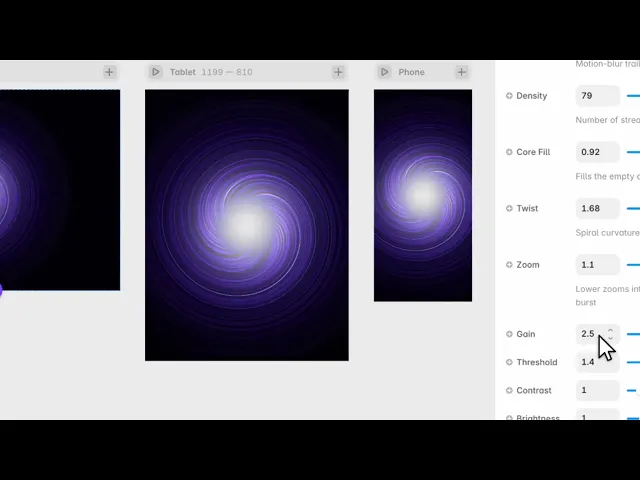
Streaks of light rushing out from a vanishing point — the jump-to-lightspeed effect, with the vanishing point following your cursor.
Controls
21 controls, 5 of which only appear when they are relevant.
Control | Type | Default | Notes |
|---|---|---|---|
Palette | Enum | Hyper Blue / Warp / Inferno / Emerald / Gold / Mono / Custom — default | — |
Core | Color |
| conditional |
Mid | Color |
| conditional |
Edge | Color |
| conditional |
Accent | Color |
| conditional |
Speed | Number |
| 0–5 |
Direction | Enum | Outward / Inward — default | Flow outward or inward |
Streak | Number |
| 0–4 · Motion-blur trail length |
Density | Number |
| 10–90 · Number of streaks |
Core Fill | Number |
| 0–1 · Fills the empty center |
Twist | Number |
| -2–2 · Spiral curvature |
Zoom | Number |
| .2–1.2 · Lower zooms into the burst |
Gain | Number |
| 1–5 |
Threshold | Number |
| 0–3 |
Contrast | Number |
| .3–3 |
Brightness | Number |
| .2–2.5 |
Center Glow | Number |
| 0–1 |
Vignette | Number |
| 0–1 |
Pointer | Boolean |
| — |
Pointer Force | Number |
| 0–1 · conditional |
Click Warp | Boolean |
| Speed burst on click |
Working through the panel
Palette
Seven palettes: hyper blue, warp, inferno, emerald, gold, mono, and custom.
The six presets are tuned, so try them before building your own. Choose Custom and four colour controls appear — Core, Mid, Edge and Accent.
Those four are layered by depth, not chosen freely. Core is the bright centre of each streak, Mid is its body, Edge is where it fades out, and Accent is the occasional highlight. Keep Core the brightest and Edge the darkest or the streaks lose their form.
The streaks
Speed is how fast they travel. Direction is outward or inward — outward reads as accelerating away, inward as arriving.
Streak is how long each one stretches. Density is how many there are. Core Fill is how solid their centres are.
Twist curls the whole field, and Zoom changes the apparent distance to the vanishing point.
Then three controls that behave like exposure settings: Gain, Threshold and Contrast. Threshold is the useful one — it decides how bright a streak has to be before it shows at all, so raising it thins the field down to only the strongest lines.
Framing and interaction
Brightness is the overall level. Center Glow lights the vanishing point itself, and Vignette darkens the corners — which frames the effect and keeps anything you place on top readable.
Pointer is on by default: the vanishing point follows the cursor, with Pointer Force setting how strongly. This is what makes the effect feel like you're steering rather than watching.
And Click Warp gives a burst of acceleration on click, which is the detail that makes people click twice.
Performance and limits
It stops rendering when it scrolls out of view, so an instance below the fold costs nothing until the visitor reaches it.
Static rendering is handled, so canvas thumbnails and exports show a settled frame rather than a blank box.
It renders with WebGL at whatever size and pixel density the frame needs — there is no image to download and no resolution to outgrow.
Good to know
No setup or coding required. Responsive across desktop, tablet, and mobile.
Refund policy — due to the nature of digital products, all sales are final. Once purchased, this component is non-refundable. Please make sure it fits your needs before completing the checkout.
Support: hi@alicorak.com




