Documentation
What it does
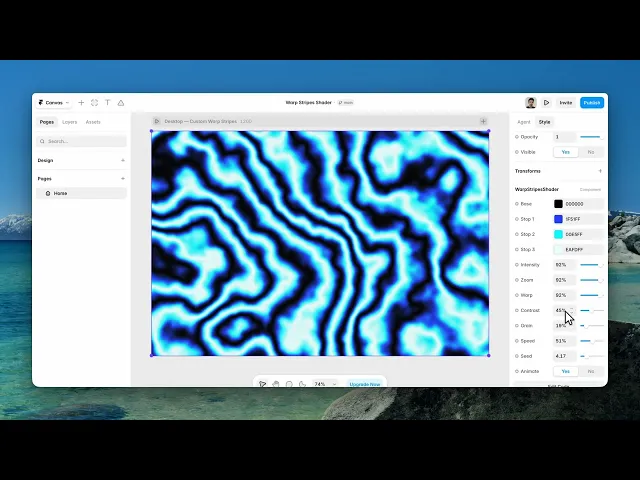
Bands of colour bent and stretched through each other — a striped field that's been pulled out of shape, with grain running through the whole thing.
Four colours build it: a base and three stops.
Where you would use it
Perfect for hero sections, landing pages, creative portfolios, product showcases, and modern interfaces that need depth and motion.
Controls
12 controls.
Control | Type | Default | Notes |
|---|---|---|---|
Base | Color |
| — |
Stop 1 | Color |
| — |
Stop 2 | Color |
| — |
Stop 3 | Color |
| — |
Intensity | Number |
| 0–100% |
Zoom | Number |
| 0–100% |
Warp | Number |
| 0–100% |
Contrast | Number |
| 0–100% |
Grain | Number |
| 0–100% |
Speed | Number |
| 0–100% |
Seed | Number |
| 0–20 |
Animate | Boolean |
| — |
Working through the panel
The four colours
Base is the ground. Then three stops that the stripes are built from.
They work as a sequence, so the order matters. The defaults run from a strong blue through cyan to near-white, and that progression from saturated to bright is what gives the bands depth.
If you replace them with three colours of similar lightness the stripes flatten out, however good each colour is on its own.
Shaping the stripes
Intensity is how strongly the stripes show against the base. Zoom is how wide the bands are — low gives a few broad ones, high gives many fine ones.
Warp is the bending, and it starts at zero. That's worth knowing, because the component is called Warp Stripes and out of the box the warp is off. Raise it and the bands start to fold, which is the whole point.
Contrast sharpens the boundaries between them.
Grain, motion and seed
Grain runs through the result and it's set fairly high by default — that's deliberate. It's what stops large flat bands from banding on a big screen.
Animate is the on-off switch for motion, and Speed sets the rate. Turning Animate off gives you a still image with all the same controls.
And Seed changes the arrangement without changing any of the settings. If the composition is wrong — a band edge landing badly behind your headline — change the seed before you start adjusting anything else.
Performance and limits
It stops rendering when it scrolls out of view, so an instance below the fold costs nothing until the visitor reaches it.
Static rendering is handled, so canvas thumbnails and exports show a settled frame rather than a blank box.
It renders with WebGL at whatever size and pixel density the frame needs — there is no image to download and no resolution to outgrow.
Good to know
No setup or coding required. Responsive across desktop, tablet, and mobile.
Refund policy — due to the nature of digital products, all sales are final. Once purchased, this component is non-refundable. Please make sure it fits your needs before completing the checkout.
Support: hi@alicorak.com




