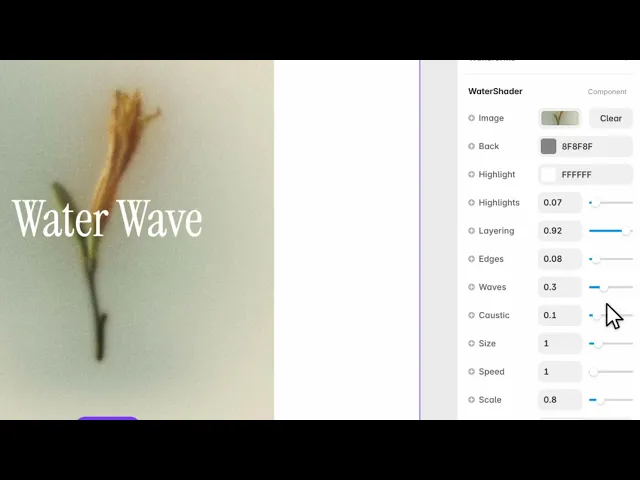
Documentation
What it does
It puts your image under moving water — refracting it, adding highlights on the surface, and casting the bright wavering lines that pooled water throws.
It's not a ripple filter on top of a picture. The image is being seen through something.
Controls
12 controls.
Control | Type | Default | Notes |
|---|---|---|---|
Image | ResponsiveImage | — | — |
Back | Color |
| — |
Highlight | Color |
| — |
Highlights | Number |
| 0–1 |
Layering | Number |
| 0–1 |
Edges | Number |
| 0–1 |
Waves | Number |
| 0–1 |
Caustic | Number |
| 0–1 |
Size | Number |
| .01–7 |
Speed | Number |
| — |
Scale | Number |
| .01–4 |
Fit | Enum | Contain / Cover — default | — |
Working through the panel
The surface
Waves is how much movement there is on the surface. Size is the scale of that movement — small gives a fine chop, large gives slow swells.
Highlights are the specular glints where light catches the surface, and the Highlight colour sets what that light is. Back is the colour of the water itself.
Highlights start low, which is right. They're what makes it read as wet, and too many turns it into glitter.
Depth and caustics
Layering is how much depth the water has — how much the image appears to sit beneath rather than behind it.
Edges controls definition at the boundaries of the wave forms.
And Caustic is the one worth naming: those wandering bright lines you see on the bottom of a swimming pool, where the curved surface focuses light. It's set low by default and raising it a little is the fastest way to make this convincing, because caustics are the detail people recognise as water without knowing why.
Image and framing
Set your Image, then Fit — contain or cover.
Scale zooms the water pattern independently of the image, and Speed is how fast it moves. Slow is better. Water in a hero should feel like a large body of it, and fast movement reads as a small puddle.
One note on the image itself: refraction distorts whatever is underneath, so photographs work far better than anything with text or fine detail in it.
Performance and limits
Static rendering is handled, so canvas thumbnails and exports show a settled frame rather than a blank box.
Good to know
No setup or coding required. Responsive across desktop, tablet, and mobile.
Refund policy — due to the nature of digital products, all sales are final. Once purchased, this component is non-refundable. Please make sure it fits your needs before completing the checkout.
Support: hi@alicorak.com




