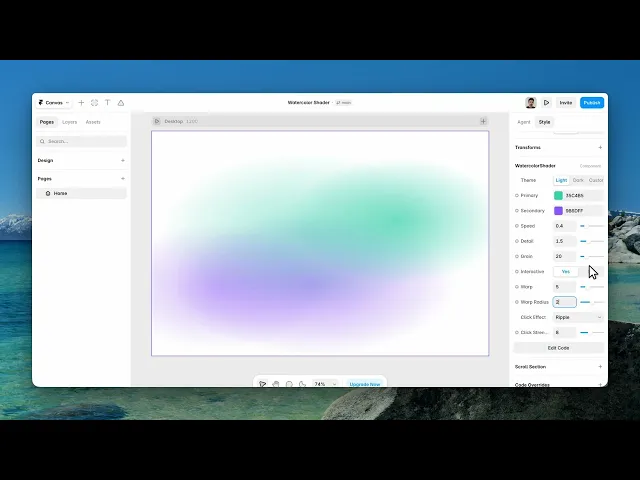
Documentation
What it does
Colour bleeding and pooling the way paint does on wet paper — soft edges, uneven density, and pigment gathering where the wash settles.
It reacts to the cursor, and clicking disturbs the surface.
Controls
16 controls, 9 of which only appear when they are relevant.
Control | Type | Default | Notes |
|---|---|---|---|
Theme | Enum | Light / Dark / Custom — default | — |
Primary | Color |
| — |
Secondary | Color |
| — |
Background | Color |
| conditional |
Wash | Color |
| conditional |
Wash Opacity | Number |
| 0–1 · conditional |
Soft Tint | Color |
| conditional |
Flow Strength | Number |
| 0–1.5 · conditional |
Speed | Number |
| 0–2 |
Detail | Number |
| 0–5 |
Grain | Number |
| 0–100 |
Interactive | Boolean |
| — |
Warp | Number |
| 0–20 · conditional |
Warp Radius | Number |
| .1–4 · conditional |
Click Effect | Enum | None / Ripple / Bloom / Twist — default | conditional |
Click Strength | Number |
| 0–20 · conditional |
Working through the panel
Theme
Theme is the first choice: light, dark, or custom.
Light and dark are complete looks — set one and you're done. Pick Custom and five more controls appear: a Background, a Wash colour with its own opacity, a Soft Tint, and a Flow Strength.
The Wash is the layer of dilute colour over everything, and its opacity is what decides whether this reads as a light wash on paper or as saturated paint. Primary and Secondary are the two pigments, and they're available in every theme.
The paint
Detail is how fine the structure inside the wash is — low gives broad soft pools, high gives the fibrous edges you get when paint follows the grain of the paper.
Grain is the paper texture underneath, and it's set generously by default. That's right: watercolour without paper texture looks like a gradient, because the whole character of the medium comes from paint meeting a rough surface.
Speed is how fast the wash moves, and slow suits it. Paint spreading is a slow process.
Interaction
Interactive is on by default and unlocks four controls.
Warp is how much the cursor disturbs the paint, and Warp Radius is how far that disturbance reaches.
Then Click Effect: none, ripple, bloom, or twist. Bloom is the most watercolour-like of the three — it spreads pigment outward from the click the way a drop of water does. Twist is the most dramatic. And Click Strength sets how much.
Performance and limits
It stops rendering when it scrolls out of view and when the browser tab is hidden, so an instance below the fold costs nothing until the visitor reaches it.
Static rendering is handled, so canvas thumbnails and exports show a settled frame rather than a blank box.
It renders with WebGL at whatever size and pixel density the frame needs — there is no image to download and no resolution to outgrow.
Good to know
No setup or coding required. Responsive across desktop, tablet, and mobile.
Refund policy — due to the nature of digital products, all sales are final. Once purchased, this component is non-refundable. Please make sure it fits your needs before completing the checkout.
Support: hi@alicorak.com




